- Yes, Add the tabs to ease navigation
- No
Before the new crew skill window, the crew skill screen had tabs separation with dedicated for as show in the picture example below:
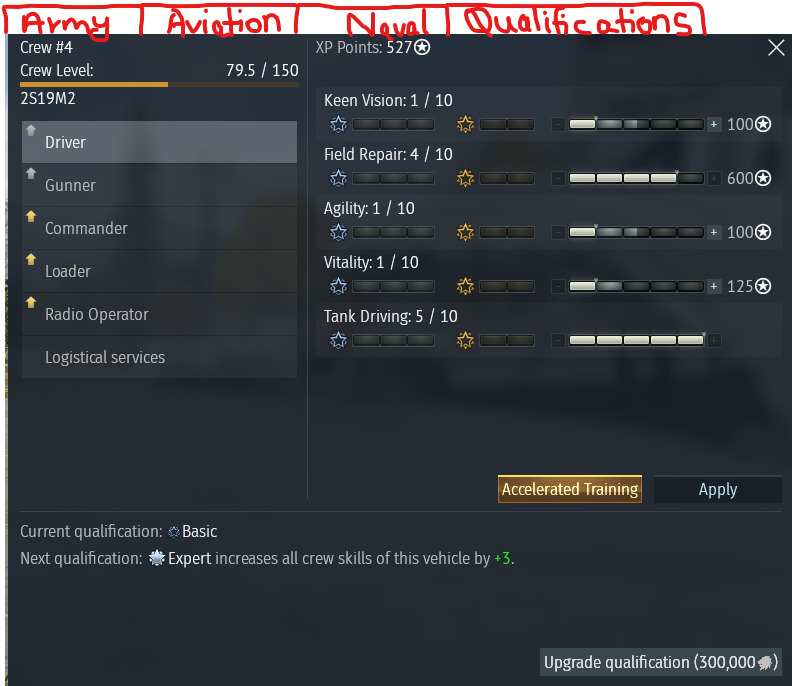
This was the style with tabs, you can quickly switch to assign skill points and look up ‘Qualifications’ > scroll down screen > see all the vehicles assigned to that particular crew slot and if they are (Beginner, Expert, Ace) which you can upgrade on the fly.
Suggestion, bring back those tabs from the old style.
- Army
- Aviation
- Naval
- Qualifications
This made navigation faster and more intuitive, especially if you want to assign skill points in a quick manner and looking through the different vehicle skill qualification. Managing multiple crew types across different nations.
After the update, these category tabs were removed for whatever reason and this is causing the player to first select the vehicle from the tree assign it to the crew slot then you can see the qualification, or if you want to assign skill points earned from one gamemode i.e. playing aviation but assign skill points to Army or Naval & vice versa in between.
Simply put, the current layout is less organized and requires more scrolling/navigation and clicking + loading, compared to the older design.