Controls-wise, unless using Simplified mousejoy MnK does not simplify control inputs.
The only simplification is that it’s easier to input precise deflections of pitch and roll (or rudder) and hold those exact deflections.
Simplified is weird and shouldn’t exist. Not even because it gives an advantage but the inverse: it creates false first impressions and makes people thinkg Mouse & keyboard is limited away from doing loops and inversions.
Legitimately, setting your controls to “mousejoy” in Warthunder is functionally equivalent to playing around with vJoy and vController to set up a driver that hijacks mouse inputs and translates them to a virtual flight stick’s y and x movements.
I use the vJoy/vController trickery to fly in Il2: great battles.
Rudder is annoying to set up. You have 2 options:
- Option 1 that I saw some more skilled people than I use: X axis deflection of mouse corresponds to rudder pedal inputs and then use Q and E to controll roll.
- Option 2 is …
In Il2:GB
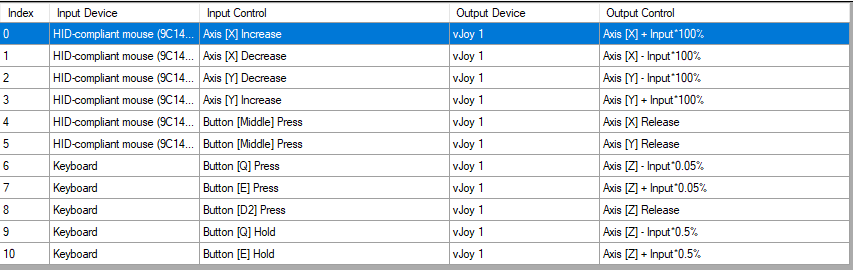
Pressing Q increments rudder in “left-hand” direction by 0.5% instantenously then for every unit time held, it increments by 0.05% on top. Pressing E accumulates in the opposite direction. Pressing 2 “lifts your feet” from the virtual rudder and resets to neutral.
(these values are for linear response in the P-51B and P-47D22. 109s need different values that I forgot).
The MMB press there corresponds to letting go of the stick.
In Warthunder:
Same idea, except we change the sensitivities to make Q and E give ~5% deflection for a very quick press and a very fast accumulation when held. This allows us to use Q and E to use the rudder to assist rolling, to prevent stalls and to kick the rudder for hammerheads.
Since this removes precise control for coordinating flight, we then bind MOUSEWHEEL (I’d do it for Il2 but vJoy doesn’t let me do stupid stuff like tab+mousewheel and ½+mousewheel so I’d lose mousewheel for trim and zoom) to increment/decrement rudder by 1.5% (same sensitivity controls both so it’s a bit of a trial and error).
This lets us minimize or angle of slip by…
We want to do left hand turn.
- Tap Q twice
- Roll into the turn and pull up
- Eyes on the ball or the Angle of Slip read-out for WTRTI
- Roll mousewheel to center the ball.
Then we want to reverse into right-hand.
- Tap 2 to reset rudder to trim value
- tap E twice
- Roll right
- Eyes on ball/slip
- Roll mousewheel to center the ball.
It’s a messed up thing you can easily forget while overwhelmed, but it works. I often forget my rudder at like -20% once I start panicking.
As for camera controls…
CAMERA
- WASD to turn head. (A-D x axis, W-S y axis)
- 1, 3 to lean left/right.
- TAB+W/S to lean forward/back
- RMB to raise head, TAB+RMB to lower head.
- 4 to instantly look back
- ½+mouse wheel to zoom in quickly/reset zoom
- Z to zoom in quickly/reset zoom
- V to zoom out quickly
- X to reset to gunsight.
I find that these camera controls on mouse and keyboard give quite decent situational awareness even in prop tier furballs. No headtracking or VR needed.
Purpose of this post: Contest the idea that MnK get simplified control of the aircraft
Purpose of this post 2: Contest the idea of MnK users citing lack of TrackIR/VR headset as a reason for not dogfighting or sth.