I installed an update via the launcher and i am still getting the issue
This worked for me thanks!
1 Like
Do not start the game using the Steam shortcut. Launch War Thunder directly via the WT launcher — it worked for me.
the “new” infantery (update) killed the server xD
Same here
seems like servers gone down 30 minutes ago
I cant find it
Can you send a Video or a Sreenshot maybe?
Worked for me, good one.
Hopefully this gets fixed soon’ish. =)
Down for me too, hopefully they now fix the game play issues that have been haunting the game recently, with the constant stuttering
worked for me.
Everyone please give this a go:
1 Like
right click the game in your steam library and click properties. you should find it here:
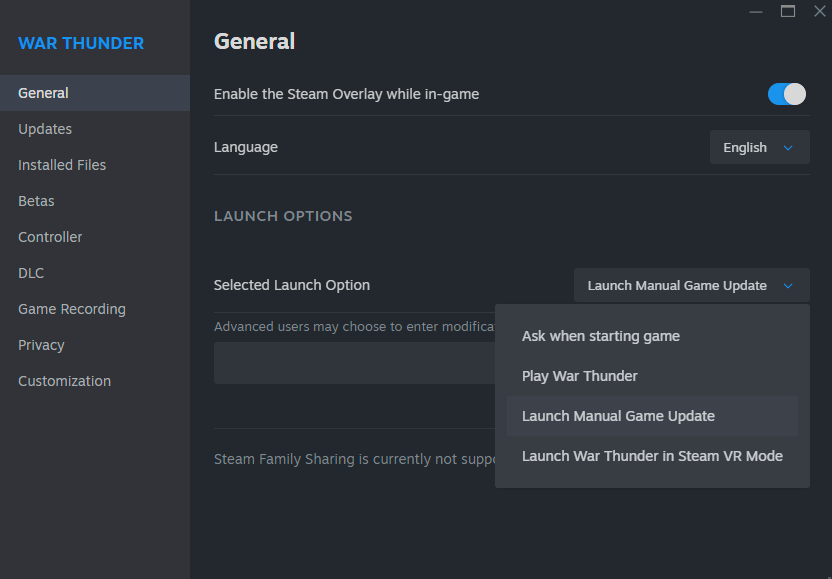
1 Like
so the problem isn’t with game servers but with Steam right
worth noting this option does not exist on linux client

2 Likes
I wish I had read this first lol, I am reinstalling Warthunder, lucky I have gigabit internet or would have been here half the day. My client had an issue two days ago and needed a repair… If the reinstall does not work I will try that, thanks for the heads up.
What should I do when the Manual Game Update works, but it doesnt load the progress that i have made ? ( i dont own almost anything, just some planes when I first started, before switching to Steam. Recently purchased a challenger ds premium and would like to play it.)
WHEN TRYING THIS, IN CASE OF THE LAUNCHER OPENING UP AND PERMANENTLY LOADING (clearly not working), END STEAM’S TASK AND RUN IT AGAIN AS ADMINISTRATOR.

Please proceed as explained here
For me - it helped to turn off the Steam and log in directly via game launcher in the files of the game. Log in to the game via login and password (not through Steam).