It feels functional on my end.


What I experience ingame is different from the screenshots just posted, I really still cannot see the black dots
4 Likes
One thing I did before testing was to delete in WT folder:
- Cache
- compiledShaders
- Patch
Then Verify Integrity through steam.
See if it makes a difference?
I just tried doing the same and sadly no difference
It’s kinda working. Not pre Leviathon levels of spotting, there’s a blind spot around 2km. Distant dots (5km) fine I can see fights developing but lose them when I get closer. Close up (<1.5km) fine, but somewhere around 2km you can zoom in and follow a target but you need to be padlocked or you lose it. Spotting is good against the sky or with wingtip vortices/con trails. Against the ground from 5km is good. Environment looks good, some stuttering assets when low but that’s always happened (pls don’t try to fix you’ll probably break something). Zoomed in from 1.5-2km shows better detail of aircraft, usual stutter of friendlies. It’s almost fixed, I’d be more pleased with lower detail but better spotting at mid range. That final set up to saddle on a bandit is crucial and I’d rather not be zoomed in.
Frame rate has stayed good 115-120 in VR, no crashes, average ping, not much package loss.
Overall- Nearly fixed. Needs a little bit of fine tuning. Well done devs. o7
5 Likes
It’s a little bit better, but still unplayable as far as I am concerned. It sounds like other people are having some luck, but I just can not see much. I agree with Bullitt-5@psn, his assessment is accurate, but I’m not going to strain my eyes trying to play in sim like this. Please try and make it like it was before the update.
2 Likes
Still really really hard to see anything. Quite often hearing jets fly by before I see them. Certainly better than before the “fix” but still rubbish in terms of the gameplay.
Would like to see it improved a bit more.
2 Likes
This topic caught my interest—for some reason, some players are still experiencing issues with contact visibility. Since my contacts are displayed (almost) as they used to be, I decided to force the game to stop displaying them. And I think I’ve figured out the root of the problem: I play with TAA anti-aliasing, and based on my past tests, it’s the best option for ASB mode. After the fix, it works almost like before. But as soon as I switched to DLSS anti-aliasing, the contacts were immediately washed out. Try experimenting with different anti-aliasing settings in the practice mode and share your results on the forum. We need to pinpoint the exact cause to properly document this issue in a report.
1 Like
From my experience, anti-aliasing is the most important setting. Personally, I don’t use any, and it works better for me. I think the difference between VR players here is that some of us have tweaked our settings and tested things until we found what works best.
That said, regardless of setup, visibility and spotting for VR could still be made more prominent to help those who are still having issues. Also, big thanks to the devs — it’s clear they’ve been working on it since the issue was reported, and it’s mostly fixed now.
@Fieel You can try adjusting the antialiasing settings or even turning it off completely. There are plenty of YouTube videos sharing different experiences, but I recommend experimenting yourself during a test flight to find what works best. If some of it works for you, you’ll see I’m not just making this up :)
1 Like
2.47.0.39. It’s a little bit better. After I reduced the monitor resolution from 3840х2160 to 1920х1080…
I use Q3, turning off anti-aliasing still does not work for me. I’m completely agree with AaronBarbarian that while it is a slight improvement for some. I will not torturing my eyes by trying to play in Sim like this.
Considering that you use the Quest 2 and your experience is vastly better than mine. I’m certain that we are BACK to the issue of having a shittier graphic give people a better gameplay than someone with good graphic. It is basically ground battle old issue with grass & object rendering transfer to Air Sim
Gotta love it when people with better PC are getting penalized for using a higher graphic setting. Being forced to uglifying your graphic for better spotting is just peak gaming
5 Likes


Rendered in 4k with FSR on native and 30% in-game sharpening on a 1440p monitor. Game version 2.47.0.39
This is ridiculous and unplayable.
7 Likes


Well

This is plane from 4 km

This is plane from 2 km

Same plane with enchanced sharpeness

Other black mess are bushes on sinai. Same plane right above number 5
I flew 10-15 games today with fella and results are equal for me and himself, despite him being in VR and i’m at flatscreen.
We see planes at 5-10 km as black dot specks, and at 4-5 - 1 km it’s almost imposible (closest to imposible) to spot. Even at contrast background like snowfields, or sky even.
And gaijings made sounds once again overbuffed for cockpit view, so, in simmod, i have better situational awarness by sound, not by my eyes.
And they lie about fix. What should i say about this developer?
7 Likes
Thanks for adding this, I’m glad my guess earlier that the blind spot was around 2km was about right. Not just me experiencing it. Not sure why Gaijin can’t just roll back the spotting to pre-Leviathan update and leave it alone, nobody likes it. Every game I’ve been in all the players have complained about the spotting.
Stoma seems to think that it’s only a small percentage but that’s because we only come here when we’ve exhausted every other avenue- checking files,updating drivers, re-installing, changing settings, asking Reddit, asking in Discord, asking others in-game, some players haven’t even signed up for a forum account. Here is the last resort due to the reception we get, it’s always our fault.
2 Likes
I just tested lots of different graphic settings and what I found out in my case is that in 4K the black dots are extremely hard to see, but if I switch to 1920x1080 they’re there clearly visible as they were before the update.
1 Like
Open fullscreen and try it yourself.
6 Likes
The thing with TAA is that it needs DX12 and DX12 is unstable and causes crashes. VR users have it all off because who wants ghosting, artifacts and dithering?
1 Like
I tried changing settings and it did make a minor improvement, but it is still not enough. They need to make it like it was before the update. I am trying to fly against ghosts that disappear as soon as they get to certain ranges. I am getting depressed. PLEASE FIX!!!
Still unplayable…
2 Likes
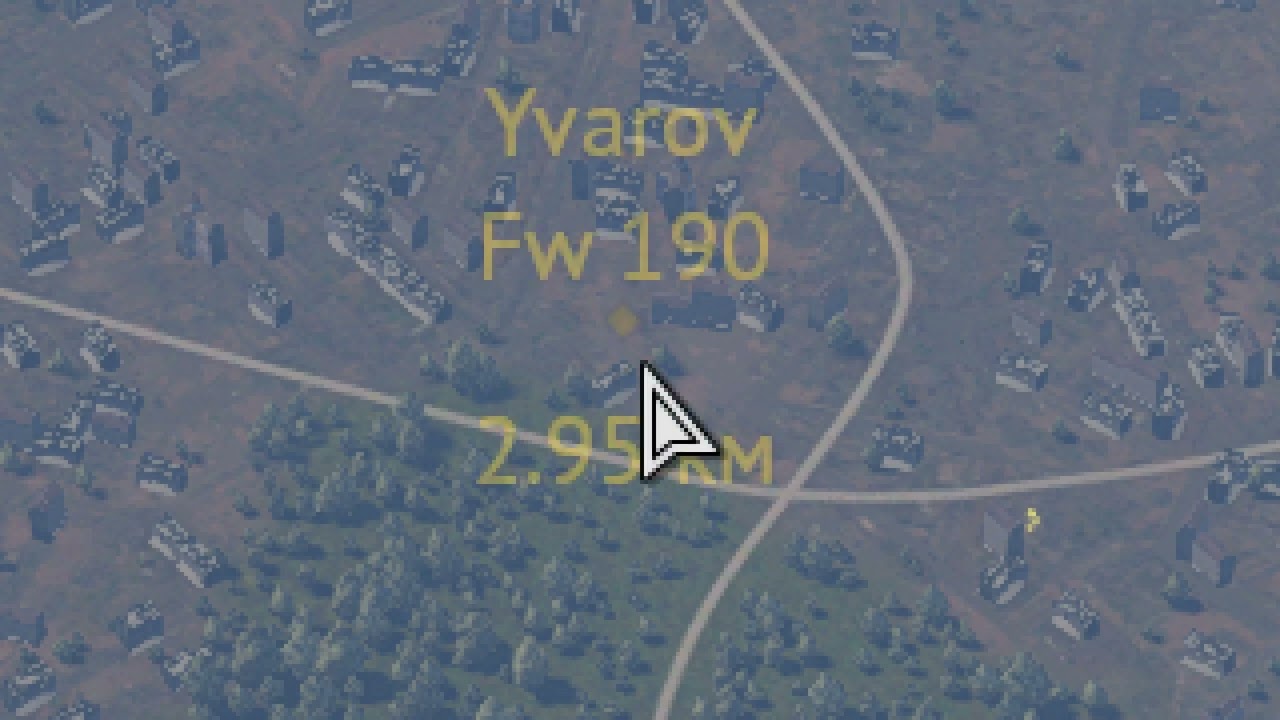
Went into a Ruhr 3.3-4.3 match with no haze. Took screenshots whenever I saw a black dot. It seems to work fine on my end - even found a Xp-55 against the ground!


Screenshots actually undersell it. Last 2 should have an XP-55 that I can’t find in the screenshot post-fact but I know I found it as I dove on it.