I AM AWARE what ‘enable axis is’ this is NOT applicable here.
- Yes
- Would be nice to have
- Doesn’t effect me
- No
In short: Currently there is no way to bind an axis to be only usable while a key-state is active. Allowing for example, binding 1 axis, to do 2 different functions.
I HAVE manually edit-ed the .blk to brutal force the game to try do this, however, it does not work. (Even if the axis is not occupied by anything else).
See images below as to what I have done.
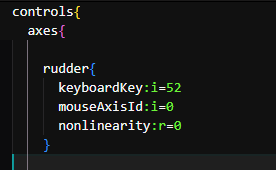
Showing the manual .blk brutal force attempt to have the mouse X-Axis be usable only if the button “.” is pressed. This does not work, as the mouse X-axis will anyway control the rudder even if the button is not pressed.
I have tried everything (Mouse Joystick, double binding keyboard keys + the axis, with and without enable axis, etc etc, no matter what combination, I have most likely tried it.

How it currently looks in the control menu, however, is very misleading as in fact
(In this case, the enable axis is set to LEFT MOUSE BUTTON however, rudder still moves with X movement with mouse, even if Mouse button is not pressed).