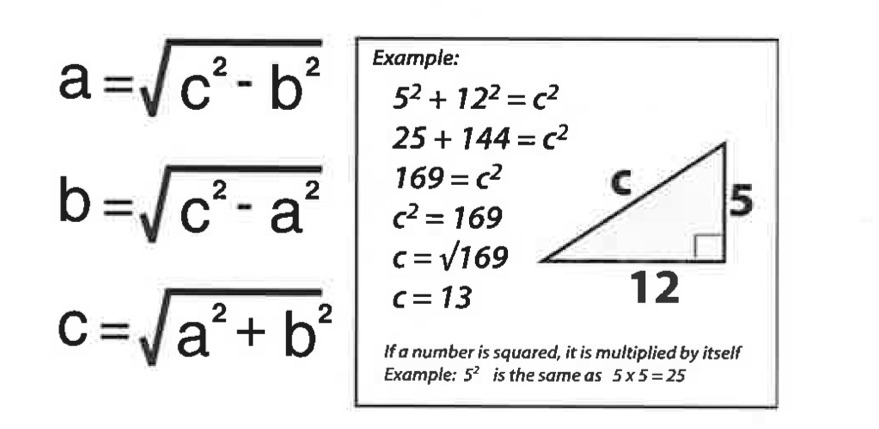
would you like to see Add Distance Ruler, Drawing Tool & Map Annotations in War Thunder?
- ✅ Yes I do!
__ - ✅ Yes… And some changes.
__ - ❌ No, its not suitable or don’t like it. (reason in reply).
__ - ❌ No, keep as it is. (reason in reply).
the Problem:
At the moment, the in-game tactical map only shows player positions and allows for a single temporary ping. This is extremely limited. When playing artillery or trying to land a long-range shot, there is no way to measure the exact distance to my target (have to guess or use a website). When trying to plan a flanking route with my squad, I cannot draw on the map to indicate the route for them to follow. I also can not save my favorite positions or strategies for each map.
As a result of this, players are forced to use 3rd party overlays, memorize distances by heart, or use vague callouts over voice chat. This is a huge disruption to the natural flow of the game and makes coordinating a squad much harder than it needs to be. Adding basic map tools would fix all of this without touching stats or game-play mechanics.
The Proposed Features (How They Work)
Spoiler
I suggest a small collapsible toolbar to the map screen with 3 simple tools. Let me explain how each tool would work.
Distance Ruler Tool: You click once on Point A, then drag your mouse to Point B and let go. There will be a straight line between the 2 points and the distance in meters will show up right in the middle of the line. To remove the line, you right-click on the map. This is great for artillery or tank destroyers who need to range their shots.
Pencil / Drawing Tool: This is a freehand drawing tool. You select it, then pick a color (say Red, Blue, Green, or Yellow) and draw right on your map using your mouse. If you want to draw a straight line, you can hold down the Shift key while you draw.
Text Annotation Tool: You select this tool, then click anywhere on the map and a box will be drawn out for you to type up to 20 characters in (e.g. ENEMY SPAAG, SNIPER, SAFE ROUTE).
Save / Load Presets (Playbooks): This is the most important feature long-time players. All your drawings can be saved locally on your computer (you can save up to 5 different presets for each map). You can load these presets in the hangar before a battle or during the respawn screen. You build a library of strategies over time and never have to redraw the same markings every match.
UI Placement and Controls
Spoiler
To keep the map tidy, the toolbar should be placed at the bottom-right corner of the map screen so it’s semi-transparent so it doesn’t block your view of the terrain.
Activating Tools: Click on the icon on the toolbar to switch between Ruler, Pencil, or Text mode.
Clearing Marks: A dedicated “Clear All” button will remove all temporary drawings from your current match.
Hotkeys: We can assign simple keyboard shortcuts (e.g. Ctrl+R for Ruler, Ctrl+P for Pencil) for players that want to use them without clicking menus.
How It Works Across Different Game Modes
Spoiler
The tools that are proposed above need to be implemented in a way that fits the style of each game mode. I propose the following:
Arcade Battles: Drawings and ruler lines are only visible to you. Since Arcade mode is a fast-paced and hectic style of play, these tools provide a helpful memory aid of your own positions.
Realistic Battles: This is where squad coordination shines. Squad Leaders will have an extra button on the toolbar labeled “Share with Squad.” When this is toggled on, every drawing, text, and ruler line placed by the Squad Leader will be instantly visible to all squadmates on their maps. Normal squad members can still draw on their own maps for themselves, but they cannot broadcast to others. This turns a simple squad into a coordinated fire-team without the need for confusing verbal callouts.
Simulator Battles: To keep the hardcore, realistic feel of Simulator mode, the drawing tools and ruler will be disabled on the cockpit HUD and the mini-map. They will only be available when opening the full tactical map (by pressing the M key) or when you’re on the spawn selection screen. Additionally, to prevent unrealistic “radar-like” ranging, the distance ruler in Simulator will only measure straight-line distances over visible terrain (it will not calculate distances through solid objects or hills). This preserves the challenge of navigation in Simulator.
Competitive Balance and Fairness
Spoiler
I want to make it very clear that this suggestion will not break the game or give anyone an unfair advantage. Here’s why:
No new information is given. The tools do not reveal hidden enemies, capture points, or spawn locations that aren’t already visible on the default map. They simply allow you to organize and visualize information that is already there.
Enemy players never see your drawings. All markings are saved locally on your computer, or shared only with your squadmates in Realistic mode. The opposing team has no idea what you are drawing.
No screen clutter. To prevent the map from becoming a mess of old lines and scribbles, I suggest a built-in “Auto-Fade” feature. Any drawing that has not been touched for 60-90 seconds will slowly fade away and disappear. This mimics wiping a whiteboard clean for the next phase of the battle. Additionally, an “Opacity Slider” can be added to the game settings so players can adjust how visible their drawings are.
Precedents in Other Games
Spoiler
These map tools are not a new or experimental idea, they are standard features in many successful tactical games. For example:
Squad and Hell Let Loose allow squad leaders to draw on the map for their entire team, which is crucial for coordinated attacks.
Arma 3 have built-in distance measurement tools and map markers for flight planning and artillery ranging.
War Thunder is a massive combined-arms game that covers ground, air, and naval warfare. It’s surprising that we don’t have these native tools yet. Adding them would bring War Thunder up to the industry standard and make the game much more enjoyable for everyone.
Conclusion
Spoiler
This is a pure Quality of Life suggestion. It does not change vehicle performance, damage models, or matchmaking. It simply makes the map more useful, helps artillery players range their shots, allows squads to plan flanks together, and lets players save their favorite strategies. I hope you’ll consider these features.
Additional Notes
This is optional, it’s fun and increase Micro realism in War Thunder.
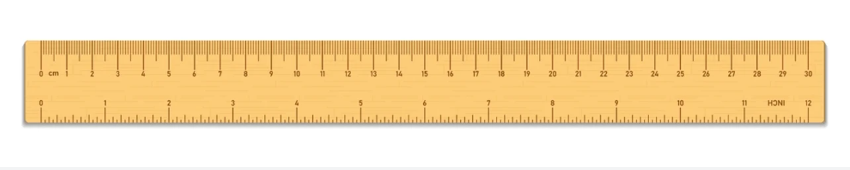
for distance calculation.
It can be just a straight line with specific color Selectable via settings, But just for realism lovers like me :)
Thanks for reading my first suggestion! I poured my heart into this.