Recently discovered the whole custom stuff scene.
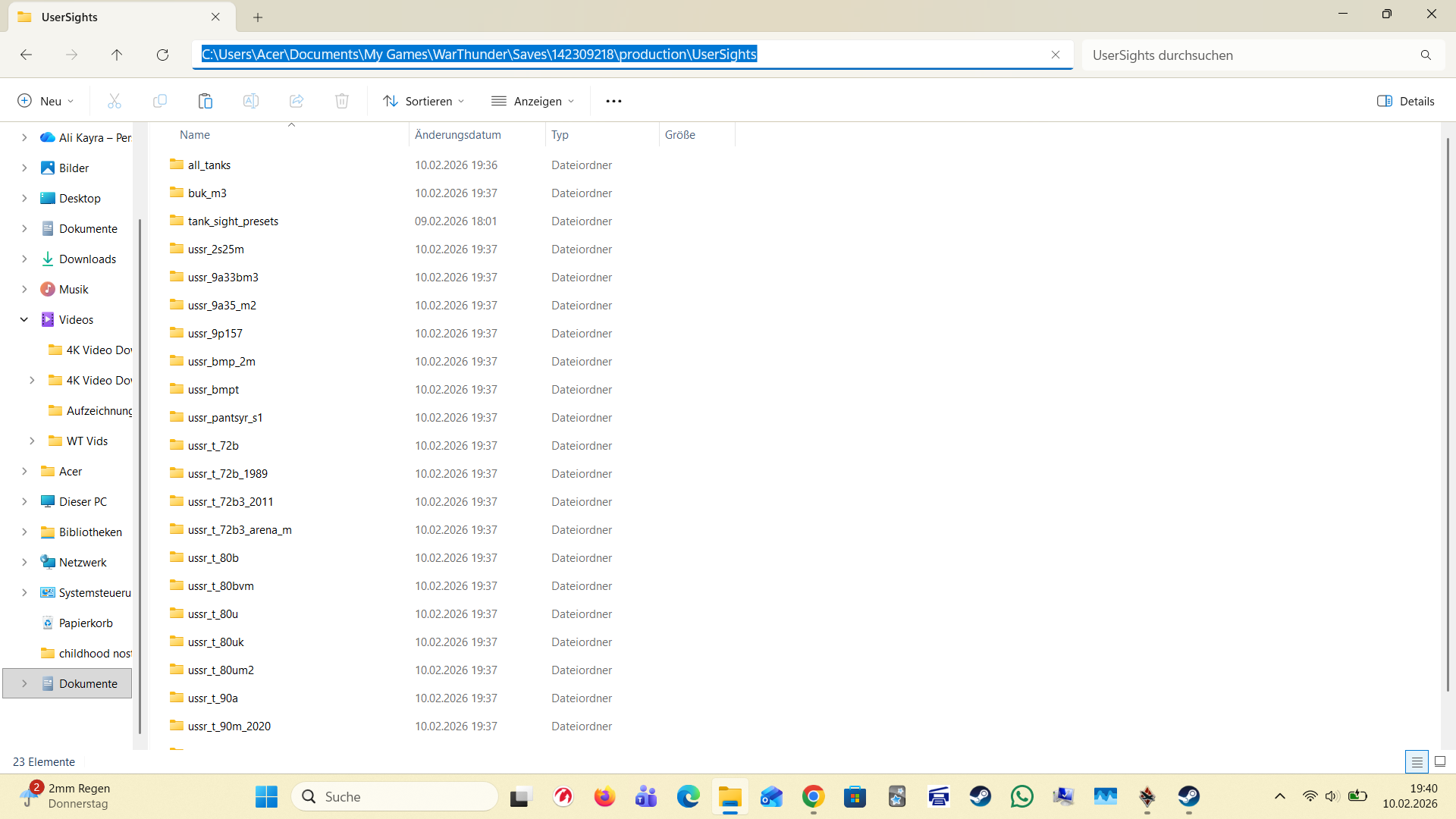
I’ve been trying to use a custom sight of T-72 sights.
Downloaded the file put it into “UserSights” loaded the game up and nothing. loaded the game up 3 more times still nothing. After I heard about a “fix” for it where you make a folder yourself labeling it “UserSight” in the old location of the game but that didnt work either.
Help would be much appreciated!!
The way for custom sight has changed at the last update.
I put the file into the folder “UserSights”
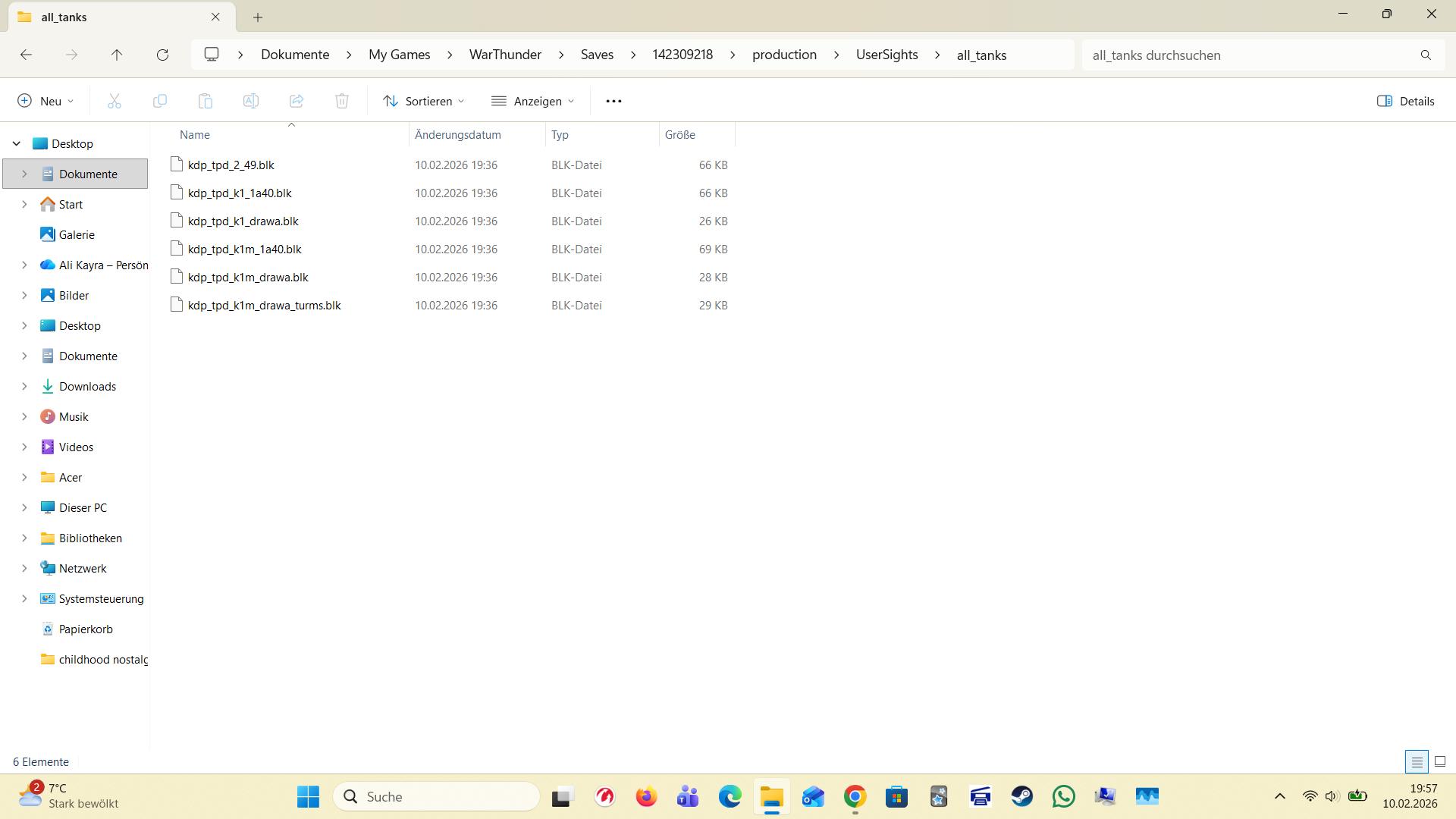
The file name would be for example (im not listing all its way too many) : “ussr_2s25m” or “ussr_t_72b” and there also is in the folder inside of “UserSights” “all_tanks” and inside “all_tanks” there is the sight files as an example: “kdp_tpd_k1_1a40.blk”
As for changing the files I did nothing. (I left the files as they are)
Yeah I am aware of that, which is why I used the instructions to a new tutorial for the current version of War Thunder.
The location changed to documents\my games\WarThunder\Saves\ [some number] \production\
1 Like
Already know that. Still wont work
sorry, i had a feeling, but i wasn’t sure, it wasn’t very clear from your wording. still, there are 2 folders with numbers. both have the same production folder and for me only one folder works, so i put the user sights folder there, but im sure you already tried them both already.
sorry, im not sure how to help further
1 Like
Hi I make custom sights, private message me in wt forums ur discord username and I can help you out.
1 Like
I do not have a discord. I’d prefer doing it on here. As far as I know the whole custom sights scene is kinda bugged rn for some players and I guess I’m one of em :/
Just gonna have to hope Gaijin actually does something. (I doubt it)
They’re not going to do anything because it works fine.
- They moved the folder out of the game files to a new location. Can you share a screenshot of where the user sights folder is right now for you?
- If you downloaded the sight from WTlive and it’s really old it could be that it doesn’t work anymore.
- The person who made the blk file may have messed up the coding inside the file, if you can, can you share the blk file here so I can take a look?
I t may also be he hasn’t configured the file to work in the all tanks folder…
@Pretty_Goose, can you show the top dozen or so lines of your blk-file’s content?
Yup
As for the file this would be the file(s):
Rank+7+8.zip (146.7 KB)
kdp_drawa_2021.07.27.zip (27.2 KB)
Do you have the individual blk files in the all_tanks folder? Not in a folder in all tanks but just the blk in the all tanks folder
1 Like
Do you mean if I put the blk file into the “all_tanks” folder in “UserSights” folder?
Yes I put it directly into the “all_tanks” folder
So I took a look at the files, I was able to open the kdp_tpd_2_49.blk just fine in game. Was there another file you had an issue with? And I looked in the coding of that file and that blk is set to only work on the t-64 1971 vehicle in game. Did you want to use a sight for all the vehicles? The issue might be that you didn’t realize these blk files are set to only work on one specific vehicle. If you want one sight to work on all the vehicles let me know, that requires changing the coding in the blk files.
1 Like
Huh… thats strange… it was shown as a sight for the T-72A
Let me have a look and see if it works for me as well on the T-64 1971
Yup… tried it out its only set to work on the T-64A apperently. Which is strange. I guess I’ll be using it for this tank then as I have just ZERO skills in coding so ye…
Thanks alot mate!
Yeah a little update here.
The game was simply bugged apprently.
I just as I previously mentioned rebooted the game about 3-4 times but now on the i think 8th time it seems to have worked. All my sights are now working for god knows what reason. So I was most likley experiencing some weird glitch.
Eitherway, thank you for being this helpful!!
1 Like