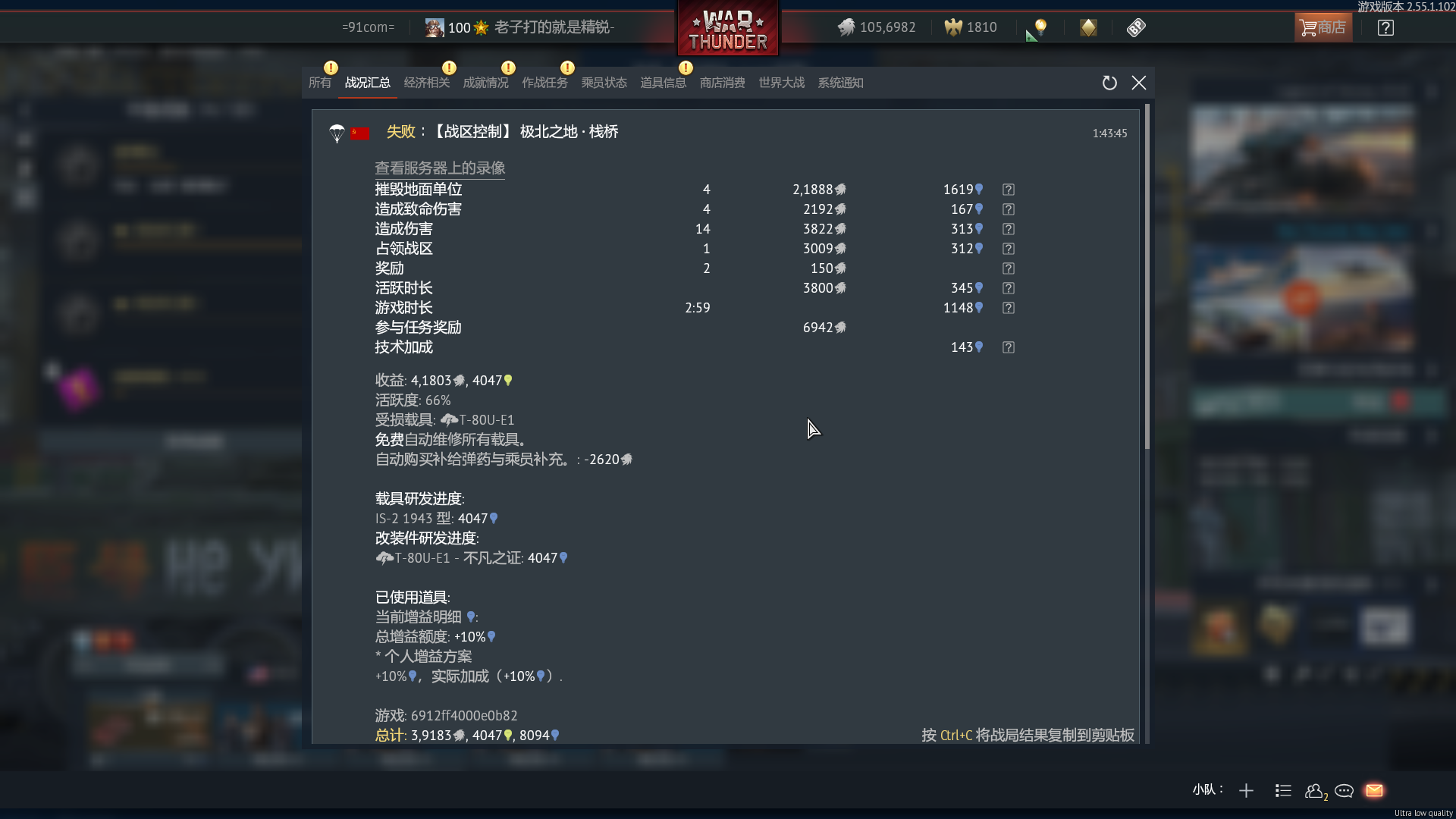
I genuinely want to ask: why does the forum moderation team seem so eager to lock threads?
Gaijin already posted the so-called “fix announcement” and “compensation notice,” yet I am still constantly getting kicked out of matches.
If the issue has not actually been resolved, why are feedback threads being closed prematurely?
Moderators keep redirecting me to the announcement thread even though the information there has absolutely nothing to do with the specific issue I’m experiencing.
At this point, I no longer have any place to continue reporting the problem — only locked threads and a ridiculous “issue resolved” statement from the official side.
The current situation is:
The servers are still unstable and continue kicking players out of matches mid-game.
Nobody answered the question from my previous thread: when getting kicked from the game, does it still count toward match statistics and are repair costs still applied?
I have already confirmed that regardless of whether my vehicle was destroyed before disconnecting or not, the crew slot still gets locked.
I hope moderators stop mechanically locking threads and at least allow players to properly report ongoing issues.
I also hope the management team spends more effort fixing the servers instead of trying to control the forum narrative.
Gaijin truly is a company with a perfectly consistent style — from the game team to the forum team, nobody seems capable of understanding plain language.
Your previous post didn’t mention you were still having these issues. It was written in paste tense, as in " i had these issues while playing a while ago " . There was no mention about still having the issues.
It’s seems like you are also the only one posting about it currently so it’s likely not a wide spread issue but a localized one to your system/connection.
Have you tried to change things to fix it? What changes have you tried if you have?
I also recommend not discussing or challenging moderation in public as that is against the rules to do, if you have questions about moderation then send a private message to one of the moderators.
General instructions for contacting moderators
You can find all the teams and the areas they handle listed here: (Who is who and Reporting Procedure). If you don’t get an answer within a few days you can add more moderators from the list to the original message instead of sending a new message (that way you preserve the date of the message and it doesn’t look like a new request), adding one of the moderators to the message every 2-3 days or so until you get an answer.
Please do not to add the seniors until you have tried all other regular moderators, the Seniors likely won’t answer unless they are added and pinged by the regular moderators but if you’ve added all the regular moderators with no answer then you can add the seniors.
Since entering the game today, I have continuously encountered an issue where I get kicked from matches. It does not happen in every match, about 60% of them.
About two hours ago, I encountered a “lost connection to game server” message (the kind where all tanks fly into the air), but the automatic leave-match function after connection loss did not work, so I manually closed the client process and re-entered the client. After re-entering, I did not encounter the server connection loss message again (I am not sure whether connection loss still happened, but I never received another warning). My ping is normal and my packet loss is 0%.
I am sure this is not a settings issue on my side, but it may be a server connection issue. However, I never received any connection abnormality warnings. Even after being kicked from a match, I can still queue and join other matches again. If my packet loss was fluctuating, I would know it was my network issue, but my client does not show any abnormalities at all.
As for your claim that no other players have reported this issue, there are actually two other players in my War Thunder chat group who experienced the same kind of kick/ban problem as I did. It’s just that our player community never posts on the official forums or Reddit.
I did not restart the computer after encountering this issue. However, since the computer was powered on this morning, the first program I launched was Steam, followed immediately by War Thunder and my VPN software.
My network connection has no issues. My VPN software monitors the network in real time and did not report any abnormalities either.
The system itself also has no issues. That computer is used only for gaming, and system updates were disabled a long time ago.
This is definitely not a hardware issue. What kind of hardware problem would only cause me to be kicked from matches while the client itself reports no errors at all?
Wi-Fi.
I did not verify the game files, but after manually closing the client that time, the game updated itself. The “kicked from match” issue existed both before and after the update.
I selected all three available servers: Russia, Europe, and America.
The last time I played War Thunder was about three or four days ago, and there were no problems at that time.
What you did with the pc after starting doesn’t negate the fact that it can have random issues that could be helped by doing a restart. Same with the router.
VPN might cause issues, not sure though and it doesn’t seem to be a problem for others in general. I would however check if the VPN server has changed to one you don’t usually connect to.
The game is updated regularly and not updating your drivers might cause combability issues. Not having issues doesn’t men that there can’t be a combability issue with a new game update.
Several. I have had SO MANY random issues that makes no sense that are caused by the weirdest things. Computers aren’t always logical in their issues.
This could also cause random disconnects due to things happening around you, something nearby could randomly be disturbing the frequency (I once had a microwave i had to move because starting it would disconnect my wifi for about 2-3 seconds, a microwave operates at the same frequency as wifi).
An update will not always fix faulty files, doing a check can’t hurt.
Did you notice any correlation between the server you were on and the disconnects?
I don’t think any further troubleshooting is necessary at this point. One minute ago, I received another “server connection lost” message. During the match, the other tanks started flying into the sky again, and both the “Leave Battle Automatically” function and the “Quit Battle” button were still unresponsive.
My VPN software shows that my connection latency to the European server through the VPN is around 80ms, so it is basically confirmed that the server is still having issues. The reason for being kicked is probably that the server is too fragile, and any fluctuation in latency results in a disconnect.
I also found a three-year-old diary from a veteran player describing the exact same symptoms, and at that time the cause was also determined to be unstable or fragile servers.
There is no need to continue troubleshooting anymore. I’m going to bed.
If you want to continue with this way of discussion then you’ll be removed from making posts & the topic will be locked.
Not really, As i said you’re the only one reporting this issue. VPN servers can still disconnect in bits while still being connected fully which causes drop-outs. Then the server has to catch up which will cause multiple issues in a match.
DX12 has caused me crashes and issues, Along with others so i’m not sure why you’re on DX12 when playing on ULQ. DX11 has better latency where as DX12 is for more modern systems & ray tracing.
Okay how about this, open the server replay and check if more players than you got disconnected, easy check to see if it’s that specific server or if it was only you getting disconnected from the match.
I don’t care whether my community account gets banned. Very few issues can actually be resolved here. If the game content and community system were normal, I guess the trend of posts on Reddit would lean toward the game itself rather than “politics.”
I’ve already explained that other players in my chat group also encountered this issue today. I went to search for this problem on the “Chinese version” of Reddit, and according to veteran players, the cause is that “the server is too fragile, and network fluctuations directly lead to being kicked out of matches. This kicking issue occurred before 2023 and after the last DDoS attack as well.” The most recent occurrence was today. I don’t want to investigate the cause anymore—I just spent money on a premium vehicle and didn’t get to enjoy the gameplay. That doesn’t feel good.
As for DX11, it causes my frame rate to suddenly drop to single digits at certain moments, accompanied by the game freezing or stuttering, and then my tank suddenly spins around on its own or other weird things happen. I reported this issue before but never got a reply. Luckily, DX12 doesn’t have this problem, and my frame rate actually improves with it. I’m not sure if the issue is caused by DX11, but DX12 is very stable.