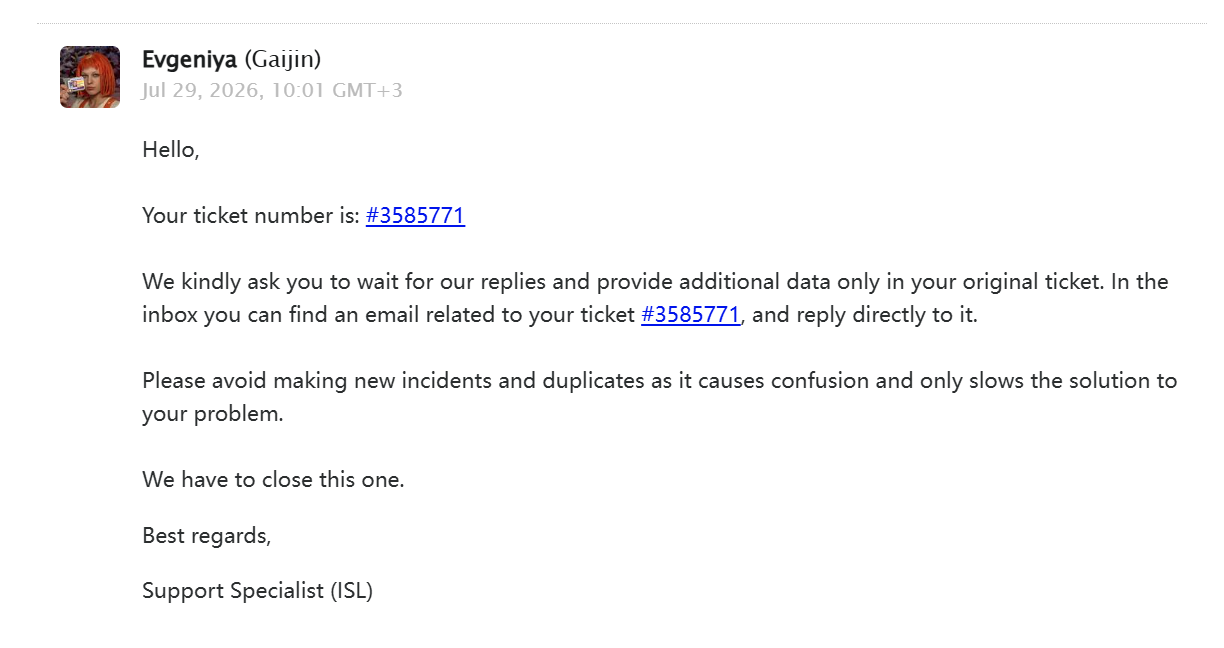
On July 22, I fell victim to a fake Steam red phishing email scam. I immediately submitted a request through the Gaijin Support website to temporarily lock my account. After cleaning all malware off my computer on July 24, I put in a new request to unlock my account.
I have sent multiple unlock requests, but the support team only replies with standard automated messages, asking me to find emails related to ticket #3585771 in my mailbox. The core problem is that I created the original support ticket solely on the Gaijin Support webpage. No emails mentioning ticket #3585771 have ever been delivered to my registered email address.
I currently have no effective method to unlock my account. All I can do is create new tickets repeatedly, yet I keep getting the exact same reply telling me to check my email. I earnestly request community moderators to help me unlock my account.
I have been playing War Thunder on this account for two years and have bought a large number of premium bundles by real payment. It would be devastating to lose my account permanently just because of this terrible phishing scam.
Please be sure to never share your e-mail address and screens of your private messages with the support. That’s the easiest way to get your account compromised.
3 Likes
Thank you for your attention to my issue. I am really anxious about my locked account. Could you please forward my situation to IISL when you get a chance, assist me in unlocking my account, and send me a follow-up reply?
Please be sure to answer #3585771 ticket via e-mail.
You need to have it on your e-mail box (check spam/bin maybe?).
From what I get from support, you never replyed to their request after the initial discussion with them.
Maybe you are confusing e-mail accounts?
No,I am sure that I have thoroughly checked both my inbox and spam folders, yet no emails related to ticket #3585771 can be found. I’ve double-checked my original registration email address and the current bound email on my account; neither one received the email you mentioned. It is possible that the message went missing during delivery due to unstable network conditions.
Could you please forward my situation to the relevant team and ask them to temporarily unlock my Gaijin account? Once my account access is restored, I will log in to the Gaijin Support website immediately and submit all identity verification materials you require for the full unlock process.
one email address at 163,another at outlook,I have just only two email address
I am really confused right now and have no idea where I can locate this email you mentioned.
Please send new ticket.
Please include all the data in it. Please be sure to have access to e-mail connected with the ticket.
After that, please wait for support to answer (it depends on number of reports they got in query).
Thank you bro,You’re truly my lifesaver.
I apologize for disturbing you again. This is the latest reply I received from support. I’ve tried every possible way but still cannot locate the email they mentioned. Could you kindly pass on my predicament to the relevant team for me?
or maybe you can tell them close ticket#3585771 first and made me able to create a new ticket
It is possible that the original ticket email was intercepted by China’s Great Firewall during transmission. As a result, I failed to receive the email and cannot respond to the ticket accordingly.
Hi
Please create one more time new ticket with the reference to the original one (3585771) as I asked in previous post.
Sorry for troubles and miscommunication.
If there will be any more issues, please answer this thread.
yes,I create new ticket to ISL,Thank you for your help and wait new reply
Since my appeals keep getting rejected, I have to mention your suggestion to the support team first. Only after I receive their response can I provide all my game data in subsequent messages.
Thank you for your support,my account finally recover today
1 Like