- Yes
- No
Introduction:
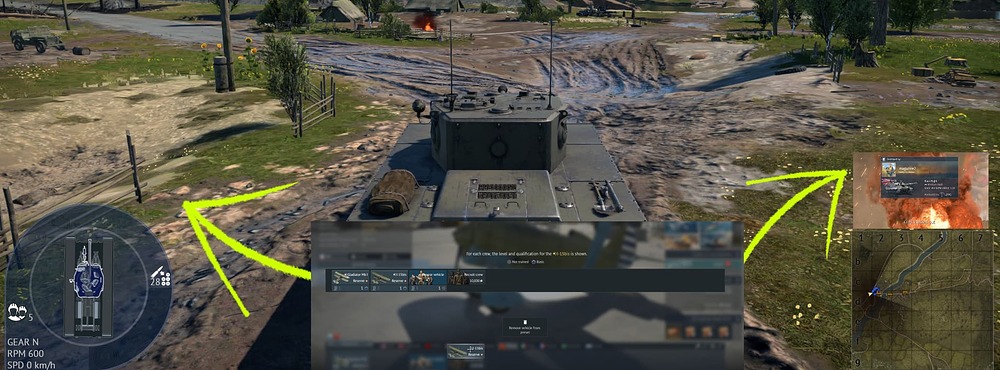
Currently, when a player’s vehicle is destroyed, the “Destroyed” card appears directly in the center of the screen. This can feel intrusive, block situational awareness. Many players have expressed frustration that the card is “in your face” and cannot be moved or resized.
This suggestion proposes adding customization options for the placement and size of the “Destroyed” card, giving players more control over their interface.
Context:
War Thunder has steadily expanded its UI customization features, such as adjustable sights and toggleable indicators. However, the Destroyed card remains fixed in position and size. Allowing customization would align with the game’s philosophy of giving players control over their experience while maintaining clarity of information.
The Suggestion:
Introduce UI customization options for the “Destroyed” card:
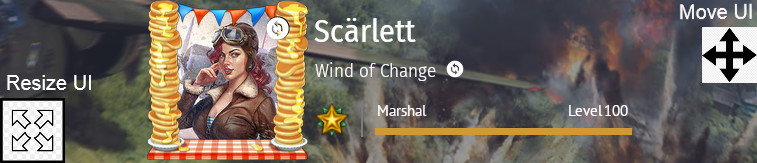
- Custom Placement: Players can drag and drop the card to any location on the screen (e.g., top-right corner, bottom-left).
- Resizing: Players can adjust the card’s scale to make it smaller or larger depending on preference.
- Optional Transparency (bonus idea): Allow players to set opacity levels so the card doesn’t fully obstruct the view.
How It Works:
- Accessible via the Options → Interface menu.
- A simple “Customize Death Card” mode where players can:
- Move the card by dragging it.
- Resize with a slider.
- Preview placement before saving.
Example images:
Spoiler
Benefits:
- Improved immersion: Less intrusive placement enhances realism and flow.
- Accessibility: Players with different screen sizes or visual needs can adjust for comfort.
- Consistency: Matches existing UI customization philosophy in War Thunder.
- Player satisfaction: Reduces frustration from having the card block the center of the screen.
Conclusion:
Adding customizable placement and resizing for the “Destroyed” card would be a quality-of-life improvement that enhances immersion, accessibility, and player satisfaction. It is a small but impactful change that aligns with War Thunder’s ongoing commitment to UI flexibility.
Cheers.
