I tried but not working. When off CCRP, bomb released
Dusting off my HOTAS and jumping into the F-4S test flgith and see if I can get it too work. 1 min
OH, it’s not working for me in Sim in test match o.O
F-4S, 3x Napalm, set to weapon selection, set ripple to drop 2, nothing happens. I am 99.99% sure I was lined up perfectly with CCRP line too.
Works perfectly in Arcade test match though.
Nor me it seems
1 Like
Okay, setting a target point via “activate target point” and pointing my nose at the ground. CCRP works. Though bomb release permission doesnt show
Setting a target point via the map, doesnt…
Let me do some more testing
Just tested in F-105D Sim test drive, works perfectly with napalm (diff napalms, that one doesn’t have the 79’s).
Even though it has the rudimentary indicator for dropping CCRP in cockpit (changed sight to “Sight mode: Bombs (auto)”)
I tried the F-4S setting the point from cockpit, didn’t work for me. F-105 did work from map.
Tonka is working from map…
This is… interesting
1 Like
Just say CCRP mode for secondary weapon is enabled when hold space
OK WEIRD LOL, I turned OFF “automatic bomb release in ccrp mode” and then back on, THEN it worked with the F-4S in sim test flight 😂
Trying again after restart, this is odd as heck lmao.
1 Like
I just got 2x Mk83s to drop from the F-4S, using map target point… and I dont know what I did differently
2 Likes
Omg lmao, set point from map, set ripple to 2 and it WORKED, I have no idea what is going on 🤣 Did NOT turn off and on the Auto mode or anything else, other than setting ripple to 2x.
I just tried with and without weapon selection, it worked every time. Set point from in cockpit, and map. I have NO idea what the issue was initially.
1 Like
Yep, seems to be working fine for me now too… Totally as I originally expected it to work…
so @ZYNL1. My suggestion is this.
Restart your game
Burn some sage
and then see if it starts working
2 Likes
Spaghetti code at its finest. Sim is just a yarn ball of issues conencted to each other
2 Likes
1 Like
I tried everything but :(
OK, so before you do ANYTHING else, double make sure you have your keybinds saved IN A DIFFERENT FOLDER. I also email the keybind file to myself every month or so to be extra sure I can’t lose them.
Cache + compiledShaders, then File Verify/Check
Then, I would first suggest deleting your cache and compliedShaders folders.
You can move/rename them to be extra careful, but I personally just send them to the recycle bin, and delete them fully later.
Screenshot:
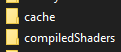
Then! Do a file verify/file check AFTER it reloads some files at the launcher/steam game page. (The compiledShaders usually needs to be rebuilt, it is KIND OF a secondary cache. Should only be 100-200 megabytes.)
Keybind reset, BACKUP KEYBINDS FIRST!!!
Try that FIRST. Then, imo, the next step is to DELETE/RESET your keybinds and try again, BEFORE you change/reload your keybind file. See if it works then. AGAIN BACKUP YOUR KEYBINDS FIRST!!!
I would say go ahead and set only the keybinds you need to test the CCRP in Sim test drive, BEFORE reloading your keybind backup file. Juuuuust to try and eliminate possible issues one by one.
If you need any help or clarification with these steps, reply/ping me again.
1 Like
I followed your instructions exactly, but the result didn’t change. It still doesn’t work.
1 Like
Say one time, CCRP mode for secondary weapon is enabled but not released
1 Like
HRM, same exact thing even after clearing all the keybinds? HRMMMM
@Morvran any next steps to try before fully uninstalling and reinstalling 😬?