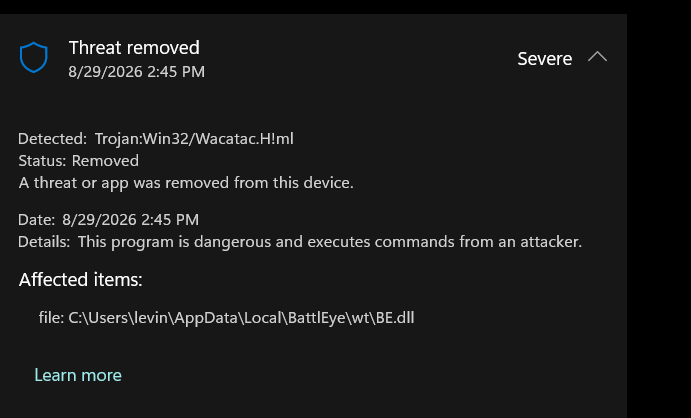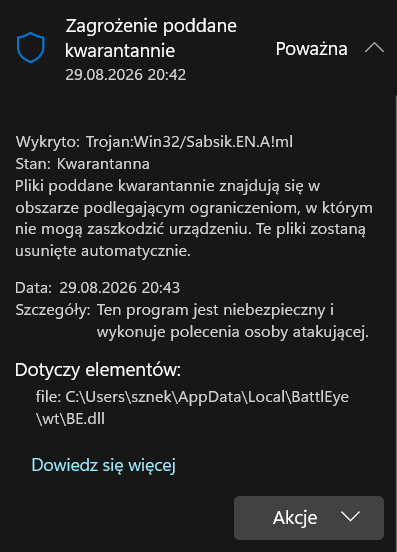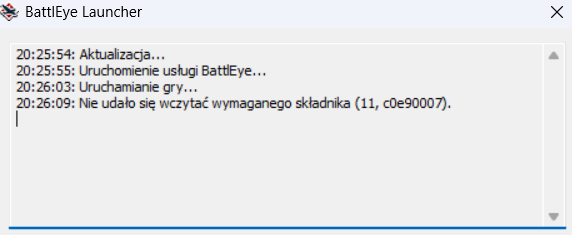
When i start via desktop it says that, but when i click play on steam it says “This application isnt for Windows” (i cant make ss of that), this happend after i restarted my pc to update gpu and cpu drivers (i use amd)
I use amd ryzen 3 pro 5450U with radeon graphics
5 Likes
Windows is saying battleeye is trojan?
3 Likes
ye and ac is disabling windows defender but it still dont work
i even run scan with antivirus that is veryfied and good and its says every file is clear
Ok but in protection history it says it’s trojan?
this is insane is it credible or is it just a false warning?
i put in a actual bug report just now
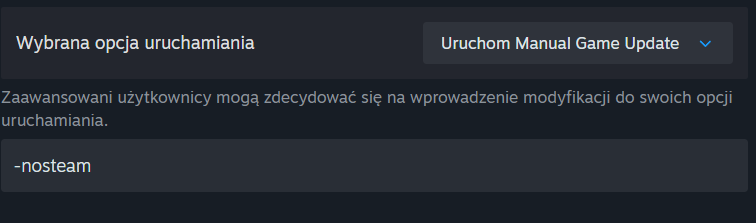
set that options on steam to launch as launcher and then you can disable anticheat and play custom battles
@Stona_WT @Smin1080p_WT I have not had an issue myself with this, but if BattleEye is being flagged by Windows as a Trojan, you might want to send a message to the Devs. (I know that BattleEye is a separate company, but still might want to have the team take a look at this.)
Thank you guys, cheers.
1 Like
you cant even add anti cheat process / folder to exclusions
1 Like
I get an “Exception Processing Message 0xXXXXXXXX (e.g. 0xc0000135) …” error when launching the game.
This is usually caused by missing system or Visual C++ runtime files that the game needs to run. Please fully reinstall the game and be sure to complete all setup steps (e.g. initial setup on Steam when launching the game for the first time).
thats what FAQ on battle eye site says. reinstalling the game might actually help. but who knows if it wont happen again since some imaginary or not trojan is still there? it will take abt 30 minutes for me to reinstall and i will update if any changes happen
1 Like
Joke: I knew there were KGB spies hiding in these files.
1 Like
someone made a mistake and might be on termination list as a failed agent now :D
2 Likes
i dont think reinstalling the game will work because if u turn off the anti cheat selection on the launcher it lets u play offline.
1 Like