I have this issue as well.
Still not fixed by the way.
I’ve been suffering from this bug for a year, what are the developers doing about it?
Oh yeah, not only it freezes the game and had to “restart the drivers” it seems, it also makes the user-made skins pitch black for the entire match. In-game skins however dosen’t go pitch black, only user-made skins (like from wt.live) do
I’ve had 7 crashes today alone. I thought it may have finally been fixed due to a quiet spell, but alas, no.
1 Like
Yeah it’s really frustrating, crashed earlier when I tabbed out whilst climbing to alt in ARB, force closed the game and restarted and managed to get back into the same game. Then I fat fingered the windows key and it crashed instantly. Fed up of this bug.
Atleast the my report has been accepted though. But I don’t have much hope seeing as having your report “accepted” is as worthless as a bike is to a kid with no legs.
2 Likes
When did the crashing stop for you? Just had a BRM answer the report asking about it from when you said this.
Yeah, I just saw and no idea. I’ll respond in a minute
and just had my first crash of the dev server from alt tab.
How many more times do I have to read this template response? It’s starting to get tiresome.
It’s really hard to work with you Gaijin without getting frustrated.
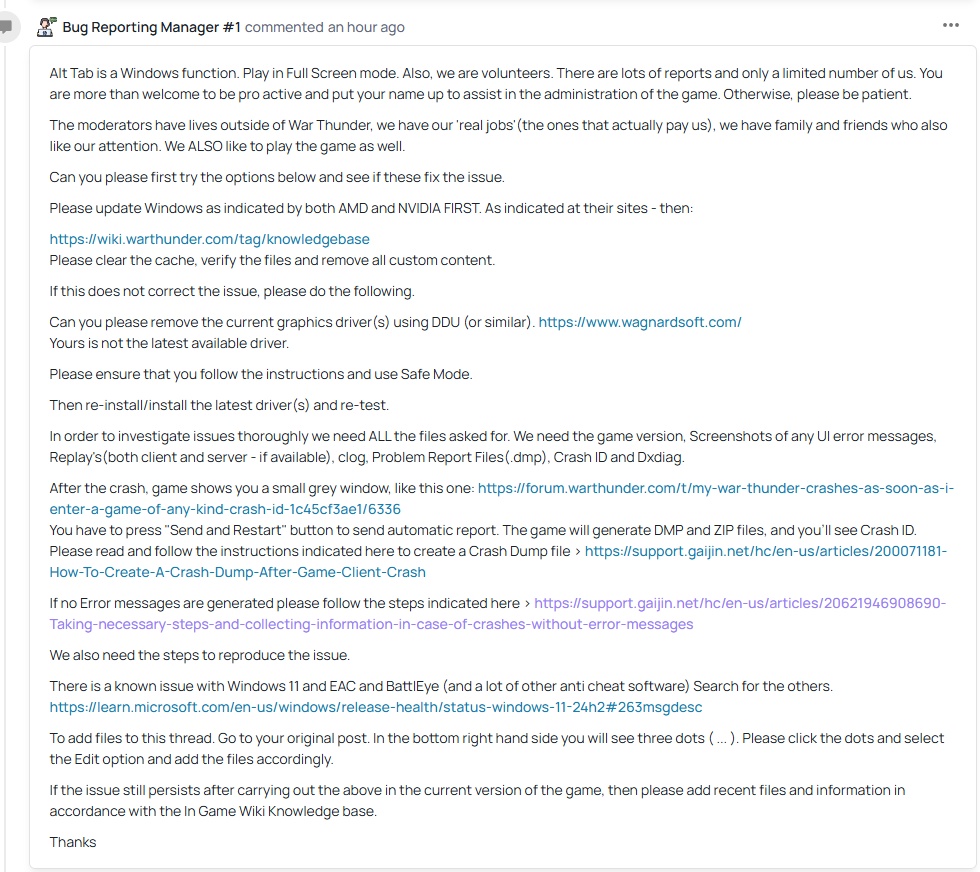
Also I wrote:
“Game freeze without any errors”
“I bought a new computer. New motherboard, new processor, new NVMe drive and new RAM.”
Everything, even my Windows is a fresh install. After few days the game start freezing again.
And yet another report that will remain without a solution, because that moderator won’t even look at it. That’s exactly what happened with the previous report, where I wrote that ‘no error is displayed,’ there’s no error ID. That report was never read either. Just like the other reports about this same bug.
5 Likes
The report about Alt+Tab was accepted, but the very next day it was marked as a duplicate of a completely different bug.
https://community.gaijin.net/issues/p/warthunder/i/HXxjftKOGDLF
2 Likes
Now I have a RTX 5070 graphics card.
At first, the alt-tab issue was still occurring, and I had removed the previous Radeon drivers using the DDU program.
Later, I deleted the folders located in C:\Users\Nazwa_użytkownika\Documents\My Games\WarThunder\Saves. Since then, the game has frozen only once, but earlier I had been changing the graphics settings multiple times during gameplay. When I didn’t change anything, the game didn’t freeze.
I only deleted the folders containing files inside the “Saves” folder — I didn’t touch the other files, since they include my keybinds and other in-game settings.
One of the folders still contained files from last year, because when I reinstalled the system, I made a backup of the entire “Saves” folder, including my keybinds.
Turning off NVIDIA Reflex helped me but I still get the freeze every once in a while. The game likes to lower my texture quality in response to “insufficient video memory” which is ludicrous when I have 16 GB of it…
Actually shortly after writing this I ended up crashing just tabbing back and forth from the hangar screen. I’ll try a driver update but I’m not holding my breath.
I had the crashes slow down for like 2 weeks and now its back with a vengeance.
Had windows corrupt and had to reinstall it and it made a massive difference in the frequency but like I said after 2 weeks its back in full force. Almost every time I tab out.
I’m 90% certain it’s a conflict with Windows rather than any drivers after doing my own testing when making a report on it. I had a spare GPU and swapped that and it made no difference. I had the AMD RX 6900 so thought maybe it was an issue with NVIDIA drivers but the crash still occurred with a full removal of the NVIDIA driver and fresh install of AMD.
Just got to hope the devs manage to fix it soon. The report has been passed but there’s been many other reports about the issue that have just gone nowhere.
2 Likes
Yeah, driver didn’t help.
Interesting. At least the cause has been sort of pinned down and a report passed. Hopefully they fix this sooner rather than later.
i have the same issue, alt + tab freezes the game. 12900k and 4090, everything is updated.
got this issue like 5 major updates ago.
super frustrating, happens almost 50% of the time when i alt tab, trying to respond to someone on discord.
they REALLY need to fix this.
they are not getting crash reports from me, i have to ‘end the task’, so it is not resulting in a automatic report.
GAIJIN LISTEN GODDAMMIT
I recently performed a deeper analysis of the game’s freezing problem. Essentially, it is more of a hang (or a freeze) than a crash, and the game itself is unaware that it is frozen. How do I know this?
I found a Python script on GitHub that can decrypt War Thunder’s proprietary .clog files. I successfully used this program to decrypt one of the log files recorded exactly at the moment the game froze.
After analyzing the decrypted file, I confirmed that there is no information about a game failure or crash within it.
Here is the explanation for why there are no crash details in these files, followed by the specific system errors I found:
1. Why are there no logs about the game freezing in the .clog files?
The .clog (client logs) files are designed to record errors, warnings, and events that occur within the game engine’s code (Dagor Engine).
- No Internal Error: Analysis of the
.clog.file confirmed that the game did not encounter an error that would cause an internal crash (e.g., a rendering error, memory exception). The logs end with routine memory usage reports (SYSmem=,GPUmem=). - External Suspension: The game process
aces.exeis being blocked (in a Hang state) at the level of the Windows operating system immediately after Alt+Tab initiated the context switch. When the game’s rendering thread becomes blocked, the engine loses the ability to write further information to the log, which is why the.clogfile terminates abruptly without an error message. - Conclusion for Support: The fact that the
.clogis clean is crucial evidence that the issue is a conflict between the Dagor Engine and the Windows Desktop Manager (DWM) during the process of regaining rendering control.
2. Where in the system can I find information about the game freezing?
Since the issue is a hang (freeze) and not a crash (failure), the key information is provided by the Windows Event Log, which monitors the state of processes in the system.
- Information Location: Windows Event Viewer.
- Path:
Windows Logs→Application.
- Path:
- Key Entry (Proof of Hang):
- Provider Name:
Application Hang - EventID:
1002 - HangType:
Top level window is idle
- Provider Name:
This entry is the definitive proof. It means that the operating system attempted to communicate with the main graphics thread of aces.exe (which corresponds to the top-level window) but did not receive a response for too long, which the system diagnosed as a hang.
Key Troubleshooting Steps Already Taken:
- The issue persists on a brand-new PC with a clean installation of Windows 11 Pro 25H2, with the game installed on a freshly formatted NVMe drive.
- Tested all display modes (Fullscreen, Windowed, Borderless).
- Switched GPU from AMD to NVIDIA (RX 6700 XT to RTX 5070) using DDU.
- Tested all available renderers (DX11, DX12).
- Disabled G-Sync and any form of GPU scaling.
2 Likes
I am going on a limb and say it’s the compositor being switched on and off when you alt tab
Even if that’s the case, it still happens at completely random moments. Sometimes it’s enough to just leave the game running in the background for a while (a few or even several minutes) and it will freeze anyway.
9800X3D & 9070XT.
I’m getting this issue as well, I have the most recent AMD drivers and have tried WT in both bordered & borderless. That said, rather than a freeze, I get a full on driver hang so who knows.