Odd, it should make a beep sound followed by your screen turning off for a moment
It does, but the game is still frozen.
I see… Not sure what to say then, maybe just waiting a moment will fix it
In Poland, we have a saying: “Hope is the mother of fools.”
😅
2 Likes
Yesterday I added a new entry to the system registry:
(HKEY_LOCAL_MACHINE\SOFTWARE\Microsoft\Windows\Dwm, new DWORD OverlayTestMode set to 5), after which the computer needs to be restarted.
This entry disables the Windows MPO (Multi-Plane Overlay).
In addition, I disabled G-Sync in the Nvidia settings (the equivalent of FreeSync on AMD GPUs).
So far, the game hasn’t frozen yet.
This is a screenshot taken immediately after the game froze when I pressed Alt-Tab.
The textures around the F-2000’s engine are corrupted.
I’m not sure if there’s a connection, but there may be issues when loading models in WQHD and 4K resolutions, which are higher than Full HD.
I’m playing at WQHD resolution.

I uninstalled the HQ textures, and the issue still occurs.
Windows has a tool called Event Viewer. It shows that something happens with aces.exe right before the game freezes.
One of the entries is an application hang, while the others are informational events showing what else happened around that time.
When the freeze occurs Windows logs both LiveKernelEvent (codes 1A8 / 1B8) and an AppHangB1 event for aces.exe, suggesting the render thread is blocked waiting for the GPU after a swapchain transition.
Windows also recorded a LiveKernelEvent (code 1A8) with a GPU watchdog dump generated in LiveKernelReports\WATCHDOG.
Windows also records LiveKernelEvent crashes (codes 1A8 and 1B8) with GPU watchdog dumps in LiveKernelReports\WATCHDOG and WATCHDOG4400 when the freeze occurs.
And this is what AI od thinking about this issue:
The issue may be related to the game’s interaction with the Windows presentation pipeline during focus changes, especially around Alt+Tab, loading screens, or hangar initialization.
Possible technical areas to investigate:
swap chain recreation after Alt+Tab
focus loss / regain handling
DXGI present path / presentation synchronization
deadlock in render thread vs main thread synchronization
hangar/loading screen resource initialization path
interaction with Windows compositor / fullscreen optimizations / MPO
watchdog-triggering GPU stall that leaves the game in a hung state instead of recovering cleanly
Guys, I found the cured!
And what is the cure?
I’m not sure which change actually fixed it, but here’s what I did:
-
Disabled MPO in every way (Registry, etc.).
-
Disabled G-Sync.
-
(The one I suspect the most)
Changed the compatibility mode of the game’s .exe that running to Windows 7 and tick disable fullscreen optimization. -
And let Omnissiah blessed this configuration.
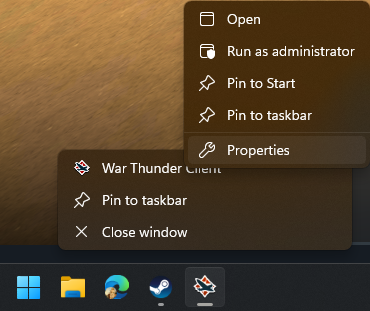
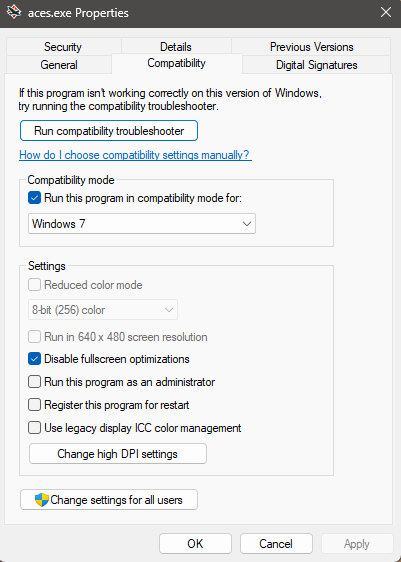
After that, the game only runs on DX11. I tried ALT+TAB many times (more than 20 times per match and playing for whole day now), including during critical moments like loading in and out of a match, and it seems stable.
“Damn, that’s two years of pain.”
I reset MPO to its default settings.
I disabled G-Sync, turned off V-Sync in-game, and set the frame rate to 5 FPS below my monitor’s refresh rate, which prevents screen tearing.
I haven’t had any freezes for the past 2–3 days, but about a week ago they were occurring. It might be related to some additional changes I made in the NVIDIA App.
I tried this combination a year ago, but it ended up freezing.
And now I’ve tried the same combination again, and it froze.
Yesterday, I updated the graphics drivers using a clean installation. I then restored my previous configuration for War Thunder (G-Sync disabled, V-Sync disabled, FPS limited to 160, I have 165Hz monitor). Today, the game froze again, although the freeze occurred after an extended play session.
Windows Event Viewer
- System

  - Provider

   [ Name]  Application Hang
   [ Guid]  {c631c3dc-c676-59e4-2db3-5c0af00f9675}

   EventID 1002

   Version 0

   Level 2

   Task 101

   Opcode 0

   Keywords 0x8000000000000000

  - TimeCreated

   [ SystemTime]  2026-03-28T22:11:02.9006409Z

   EventRecordID 57212

   Correlation

  - Execution

   [ ProcessID]  21676
   [ ThreadID]  9716

   Channel Application

   Computer DESKTOP-PS3EMGC

  - Security

   [ UserID]  S-1-5-18


- EventData

  AppName aces.exe
  AppVersion 2.55.0.40
  ProcessId 0xd0c
  StartTime 0x1dcbed80c2b72f0
  TerminationTime 4294967295
  ExeFileName D:\WarThunder\win64\aces.exe
  ReportId 3739c246-3040-49db-bb81-f84b29650cb6
  PackageFullName
  PackageRelativeAppId
  HangType Top level window is idle
+REP alt tab crashing is annoying
Try to open the game first, then right-click and go to Properties.
it feel sooo good that Im free from this suffers. I haven’t faced this problem ever since.
Windowed screen works like a charm for me
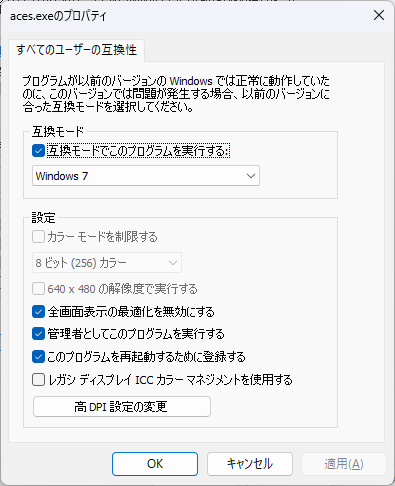
Unfortunately, it still freezes even when I set the compatibility mode to Windows 7
I noticed that for me War Thunder would only hard freeze when I alt tabbed between my browser and the game. And even then usually only if the currently focused browser tab was playing a Youtube video or something similar. (I am using Firefox as my browser, and I am on Windows 11.)
Anyways, disabling hardware accelerated graphics in my web browser settings has seemingly fixed the issue.
EDIT: I just noticed how old this topic is. This issue only started happening for me around a week ago give or take. Not sure if it was a game update or a graphics driver update that caused it.
Is the cache file for this game working properly?
After deleting it and reopening the game to play just one match, a cache file of 632MB has been generated.