My computer screens, including those of many people, show this.
How can I play the game better? Did the production team not notice at all or what?
When can this problem be solved?
Uploading: 1.mp4…
Try clearing the cache folder in your game installation, then restart computer
I remember my first update.
May I ask what kind of files are the cache files? Can reinstalling the game after uninstalling it solve the problem?
In addition, there is another issue: during the game process, there will be sudden lagging for several seconds. After the lag, the player’s vehicle directly turns pure black, and the system prompts that the graphics card has crashed. But what puzzles me is that I haven’t received such error reports when playing other games.
Graphical cache files mostly
Probably, if issue persists it might be graphics drivers or something
That sure sounds like graphics issues, are you on dx11 or dx12? Also check drivers are up to date and so on
DX11.The driver is indeed the latest version, but the problem still exists at present. I already want to uninstall and reinstall it first.
Thank you for your reply.
if you havent already done this
just delete the cache folder first, it fine to do
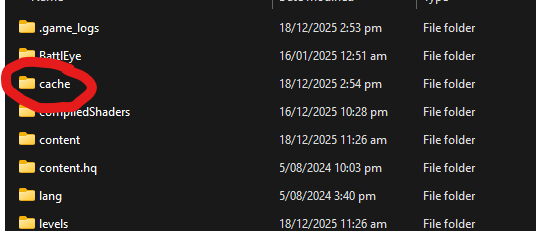
located in game directory
if it works it saves time, if it doesnt it hardly takes any time
Ok,thank you very much. I’ll try again.