Everyone calls this a useless feature , but i want to sometimes listen to some music , and save me FPS and etc. so i want to add some radios to have fun while in Air Battles or Naval , but no matter what i did how many URLs i put it just simply doesnt work , why? If it doesnt work please fix it or either remove it if it has no purpose.
Thank you.
1 Like
It does work, got it working about a few months ago but there is a very specific criteria. I will link a guide which is old but it should still help.
2 Likes
Well i more specifically want a greek station will i be able to get that ?
It should, as long as you can grab the info from the files
Unfortunately the old-forum link is busted, anyone else know of a way to set this up?
You need to be able to find the .pls file associated with the radio station. The URL can be opened in VLC media player (which is what I did) to grab it. Go to the file information/properties in the media player and you should find the correctly formatted address to paste into war thunder.
Example link: (http://IP Address:Port/stream)
I have found some radio station links from trawling old posts:
http://94.130.242.5:8004/stream - PartyVibe DrumNBass
http://94.130.242.5:8046/stream - PartyVibe Techno
I do not use these but they may help in troubleshooting
2 Likes
How can I find the .pls file of a station? Or the URL?
Do you have an internet radio stream in mind? Or are you trying to find some?
Here’s a general reference as others may be interested.
Note that this kind of music streaming is not like Spotify, YouTube, etc. e.g. You can’t skip songs. You just get what you’re given and can either play it or not.
Also, many streaming radio websites may not able to be used in War Thunder if you can’t get a URL to the specific stream itself. If you get an embedded player, or something similar, it probably can’t be used. (There are ways of finding the URL in the page source, but it’s a bit in depth and out of scope here).
So, for an easy example, check out https://www.internet-radio.com/
Find a radio stream you like. I’ll use “Zero Radio” as an example:

Look for the “.m3u” download link which will download an .m3u file.
Open the file in notepad/text editor and it should show the URL.
This will be the URL to put in to War Thunder.
In case you search other websites and only get a .pls file, just also open that in notepad/text editor and look for the URL. (It will have extra lines in it, but just find a URL)
Also, in this particular website I referenced above, you can also just do the “popup” option, which will open another browser window which will show the URL in it. Similar to shown below. (You may need to resize it to see the full URL)
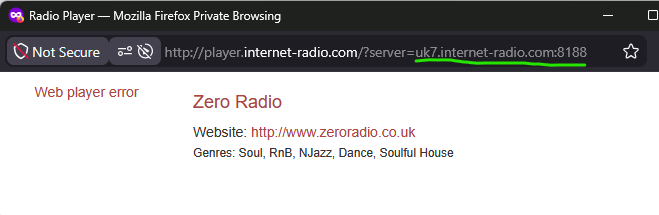
You can then use the bit after “?server=” (I underlined in green) to enter in to War Thunder. You may need to do “http://” first though.