After the Line of contact update, im aware that usersights are no longer in the “UserSights” folder, but they should appear in the “Saves” folder. However, the “Saves” folder did not create for me. I even have tried to manually making the files, wich were Saves/“my user id”/production/UserSights and in that “UserSights” folder that i manually made, i created an “all_tanks” folder and put a sight i downloaded off WT live in there, however the sight does not appear ingame. I use the Steam launcher, so i have tried to replenish my files and even deleted and redownloaded the game, however even this did not fix the issue. What can i do to make custom sights work again?
1 Like
Same here; I tried putting in a custom sight in all_tanks for both the new location and making the UserSights folder in the old location, doesn’t show up in game either way.
Note: If you put a sight into the “all tanks folder”, the blk of the sight must also define for what vehilce or vehicle class the sight is to be used!
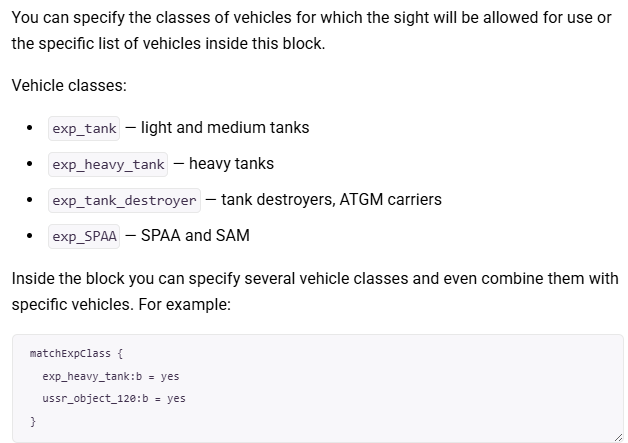
(from User-made sighting reticles | War Thunder Wiki)
If you don’t have such a block in your blk, the sight will not work if the folder is placed in “all tanks”.
If you however have a “named folder” with your sight blk inside (the name being the exact ID of the vehicle), you don’t put it in the “all tanks folder”.
1 Like
Those are already listed in the file and Im guessing that “exp_class1” would be for all rank 1 vehicles? So if I wanted it for every rank 8 vehicle, would I put “exp_class8:b=yes”?
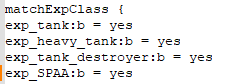
EDIT: Nevermind I was looking under presets and not reticle the whole time. It appears under reticles
i dont undestand what im looking at, is this code we have to add to old sights for them to now work, or?