Hello everyone, this issue happened latley with my Desktop sepcs: Windows 11, 32GB RAM DDR4, Ryzen 7 5700x and RTX 4060 8GB. i was playing warthunder like any other day with FPS up to 400, the next day when i loaded into the game i was getting only 40 while other games worked fine,i dont have such powerful graphics settings and i updated my drivers. If anyone could help me solve the issue that would be perfect
If you’ve already updated all your drivers then i would recommend a file integrity check for the game as a first thing to try.
Second thing to try:
A soft reset for the DX11/12 can be done by switching to the one you’re not using of the two, restart the game, jump in to a test drive (to make the game load files), set it back to what it was before, restart game and try another test drive.
Third thing to try:
You can try deleting the “cache” and “compiledShaders” folders and running the file check again to re-download those folders.
Hey sorry for seeing this right now, i don’t know how to do the first thing so i did the 2nd and 3rd thing like you have told me. 3rd option didn’t work but when i have switched to option 2 my fps was back at 300 clearly the issue is something with DX12, thank you for helping.
Best regards.
The file integrity check depends on if you are using steam or the standalone client.
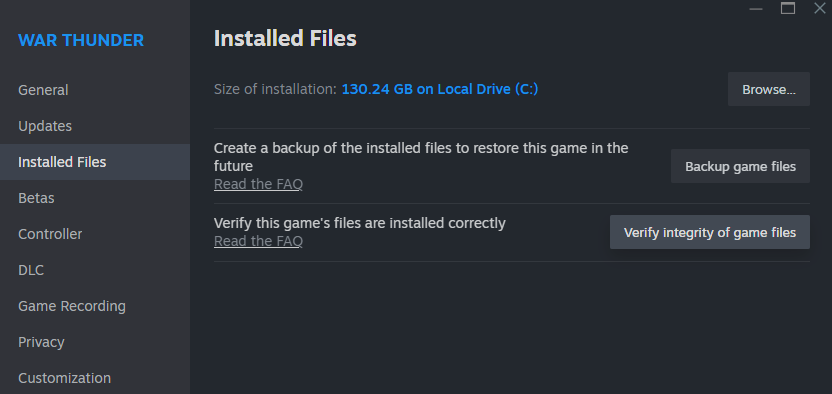
For steam you right click the game and choose “properties”, then under “installed files” there is a “verify integrity of game files” button.
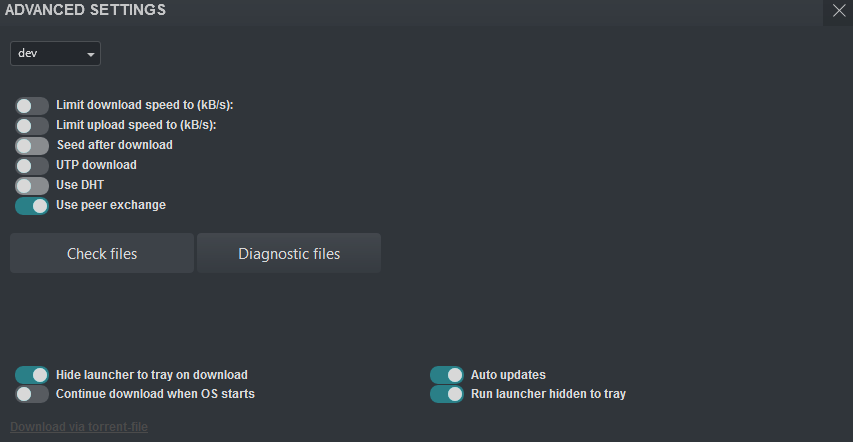
For the client you click the wrench top right and then “check files”.
Yes, thank you i found it and now my game is back at the normal with the FPS like it used to be. Thank you very much for the help.
1 Like