As the title says, when I’m in the menu and move my mouse quickly, my MacOS cursor will appear in-game while my War Thunder cursor is still on screen, and I can’t seem to find a fix for it even after we had an update saying it was patched.
3 Likes
Hello, I am having the same exact issues, I think it has something to do with the update, as this was not happening to me before the update but it is now
@Pony51 Got any idea to fix this issue? It has been here for a while since I start playing War thunder it is very very annoying and also ruined your recording when your trying to do a cinematic recording. Anyway to fix it?
1 Like
Does this still show up? If so, need a new report with latest CLOG, screen shot, and ideally a video.
It’s very annoying when it pops out in the middle of the battle and just freezes over there.
hello? @Pony51 Please… help. It been almost 4 years. You have only sent one messgae please don’t let me wait for another 4 years to get the 2nd message…
Hello, I need a CLOG file with the videos, and you system spec.
Then I will have the needed files for a report.
Where do I find the CLOG file?
System Spec: is Apple M1 Pro 2020
A guide on how to report bugs can be found here: ([Navigation] Technical Knowledge Base | War Thunder Wiki) The last part of the guide also shows how to get all the files and where they are located.
1 Like
Do I have to create another one? Because I found out I created one 3 years ago: Community Bug Reporting System
I can’t really find the CLOG file still…
Yes.
I think this is correct but a Tech Mod would have to confirm:
Major updates can change things by a lot so depending on what the issue is it might not be caused by the same bug anymore after a larger update. The code that causes the bug might also have been changed but still cause the bug so old files will make it so much harder to pin down the issue if not impossible at times. and 3 years of updates is going to have changed things A LOT.
It’s created every time you start the game and are finished as full files when you turn the game off and they land in a folder called “.game_logs” that is located in the folder where you installed the game.
Since i play via steam my .game_logs folder is located here:
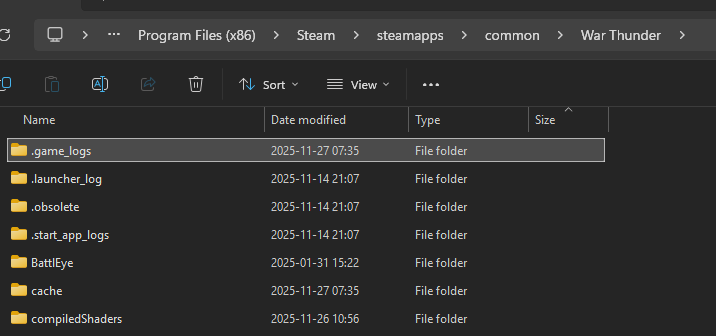
But that is different depending on where you chose to install the game.
They are automatically named the date and time of when you started the game.
Example:

1 Like

Yes ^^
So when you see the bug happen again, take a screenshot (it isn’t primarily used for the image but it makes a marker in the code for that timestamp, otherwise finding the section of code would be near impossible for the DEV’s) then play the match to the end, turn off the game (to make the CLOG file complete) and copy the latest created CLOG and the screenshot (found in the “screenshot” folder in the war thunder installation folder) to someplace where you can easily find them (i suggest your desktop). Then create a new bug report where you attach the CLOG and the Screenshot as well as describe the issue and what causes it as best as you can. Good luck! :)
If you have any issues with any part of the process in creating a bug report in the future i recommend sending one of the Technical Moderators a private message for guidance. You can find all the teams and the areas they handle listed here: (Who is who and Reporting Procedure). If you don’t get an answer within a few days you can add more moderators from the list to the original message instead of sending a new message (that way you preserve the date of the message and it doesn’t look like a new request), adding one of the moderators to the message every 2-3 days or so until you get an answer.
Please do not to add the seniors until you have tried all other regular moderators, the Seniors likely won’t answer unless they are added and pinged by the regular moderators but if you’ve added all the regular moderators with no answer then you can add the seniors.
2 Likes
I also submitted a bug report about this issue, but it doesn’t seem like anyone is looking at it. Does this mean that this bug will never be fixed?
https://community.gaijin.net/issues/p/warthunder/i/d6yjiWSjSkyK
It can take a lot longer than 3 days for a report to be handled. If it hasn’t been looked at in a couple of weeks or more then you can message one of the Technical Moderators to ask about it.
1 Like
Hey everyone! I think I’ve figured out the solution!
Just go to System Preferences on your Mac and set “Automatically hide and show the menu bar” to “Always.”
That’s what fixed the issue where the mouse cursor kept appearing for me!
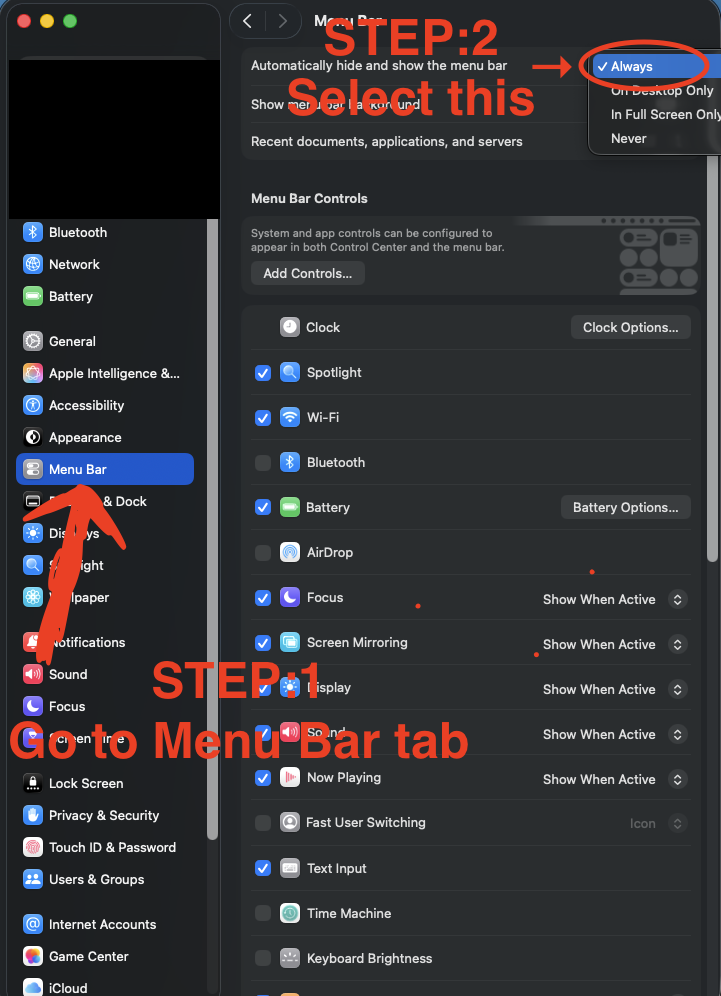
1 Like
I’m using MacOS 26.4.1