Hi everyone,
I’m looking at my storage and I think we need to have a serious discussion about War Thunder’s optimization path. My installation is currently at 202.6 GB.
When we compare this to the current industry standard for 2026, there is a clear discrepancy in data density vs. engine features. For instance, Battlefield 6 (which includes a full campaign, massive real-time destruction, and high-fidelity environments) occupies only 125.8 GB.
The Technical Concern: War Thunder is now 80GB to 100GB larger than titles like BF6, Cyberpunk 2077, or RDR2, yet it maintains a relatively static environment. My HQ Texture packs alone (Air, Ground, Environment) sum up to 71 GB.
From an engineering perspective, this raises some critical questions:
-
Redundancy and Stacking: It feels like the game is simply stacking legacy assets and old files on top of new ones for years without a proper purge or consolidation. These high-res packs alone are almost as large as the base game client, it’s like having two separate games installed. Where is all this data going if the environmental physics remain so limited?
-
Compression Pipeline: Is the Dagor Engine utilizing modern standards like Oodle or Kraken? A 71GB texture footprint for vehicle-focused maps suggests a need for more aggressive compression or a better LOD streaming system.
-
Physics vs. Storage Ratio: One would expect a proportional increase in environmental complexity (like destruction or interactable assets) as the storage requirement grows. Instead, the footprint balloons while maps still feature low-quality tree animations and indestructible assets.
To the community and developers: Does it make sense for a game to occupy over 200GB of SSD space when its mechanical complexity hasn’t scaled at the same rate? We don’t just need more content; we need a Technical Health Update to bring War Thunder’s data management in line with modern AAA efficiency.
1 Like
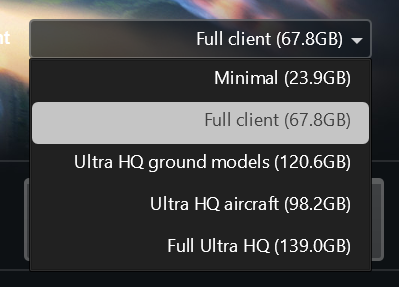
You got 60GB of skins or am i missing something here?
1 Like
No, I do not have skins in the game, maybe because my game is from Steam? idk. But even so, a game of this kind should not be so large.
My game is also installed through Steam and is 68GB. I know I haven’t updated my game for a bit on my laptop but it shouldn’t be much larger than that. You can always try reinstalling, maybe some things stuck around that shouldn’t’ve. If you want ask others to see their storage size.
1 Like
You also need to remember that there are (not sure what the current count is) but maybe 3000+ vehicles in the game. Sure some skins will be shared, but there will still be a lot of individual ones which will contribute a lot to that size (and especially considering that many vehicles have multiple skins… not just 2… but 3…4…8…)
Edit: checking my game folder size, it’s 72GB for the full client (which shows as 68GB as per Zuliza’s screenshot… nearly 3GB in the cache folder, and a little more space in screenshots, replayus, etc so not too much different from what the client shows)
Edit 2: Forgot to mention, I’m not through Steam… just regular client.
1 Like
This point makes sense, but it is a lot, it is a vehicle with several skins that takes up more space, mainly because it will duplicate the skins when it is HQ.
While not exactly related to your original post, but just rather about how much space War Thunder takes in general, I’d recommend everyone to try the various client options/sizes. That is, the Full client, ultras and Full ultra… (if you have the download capacity to change it easily that is). If you can’t really see a visual/quality difference between them in the battle action… go with the smallest size one that is best for you.
I’ve installed full Ultra HQ through steam, i’ve had the game installed for a couple of years without changing anything with the files and i’m currently at 152GB (this includes the extra files for the infantry beta test)
It sounds like you have either a huge backlog of temp files or have accidentally installed two versions at the same time (like normal + dev server installs for example).
1 Like
I recommend purging your local installation and verifying through steam.
I honestly do that every few updates otherwise spotting gets janky. At minimum, I wipe CompiledShaders, Cache and BattleEye. Rarer, I purge everything but settings files.
Without HD textures, my installation is 82 GB.
1 Like