at this point ive dumped a little more then a days worth of looking into how to use a WT live sight and ive watched many “how to” videos and none work they are all vague and useless to me it always comes back to that i have to make my own Usersigh folder and how see it the Offical video from WT covering the sights does nothing on how to add one form WT live im just annoyed and disappointed ive wanted to make form WT live for months
1 Like
if you just make a custom sight with the defaults and save it it should create the folder, then you just extract the WT live sights from their zip file into into it (the UserSight one, not the “tank_sight_presets” one inside it), hit Alt-F9 or restart the game and you should be good to go
If you’re on windows:
- Go into C: documents
- My games
- Find the war thunder directory in it
- Go to Saves
- Go into your user id
- Go to production
- UserSights (if this folder is missing make it INSIDE of the production folder. Right click in the folder → new → new folder
- Then go into that folder and create a folder inside of it called all_tanks or whatever the tank vehicle id is (if you need to find that make a userskin for that, and it will come up as template_xxxxxxx, remove the template_ from the name. For example if it was template_hjnbnb then the vehicle id is hjnbnb). I personally just lump everything into all_tanks so I can use any usersight on any tank.
- Download the usersight you want from WT Live or Nexus.
- Extract the .BLK into all_tanks or whatever tank folder you create.
- Go into war thunder → options → search sight → make a sight preset and dont forget to press save every time you do it. I forget to press save all the time XD
If this wasnt very clear let me know
its clear just the sighs never show up like i did everything and it just doesn’t work at this point i feel like im starting to think i just cant for some reason
Are you putting JUST the .blk file in the all_tanks folder? Putting the entire folder you download wont work
If you are, are you selecting the right option in war thunder? You need to look in the reticle section not the usersights section (idk if that makes sense)
can you show us a screenshot of your usesight folder please? for seeing clearly the situation in that folder.
I make a tutorial for that. only error is the new path of the usersight folder i dont update for the moment (i must make it …)

this is in my all tanks folder
Edit: does the image work?
My buddy told to to extract the BLK then copy it into the folder
Look into your folder, i think you will find tank’s folders (like germ_pzkpfw_VI_e_tiger ). you must have that sorts of folders in the usersight folder, not your “custom” folders.

is this what you mean? or am i doing it wrong
that folders are standard folders for all tanks in game.
if you want a specific tank, you must have the specific named folder.
Sorry im really tire rn but i dont really understand this very well I just want a WT live sight for all my tanks im sorry if im being a pain in the ass about this
Do I copy the whole folder or just the BLK files?
well, if i understand, you want a sight for all your tanks?
you need this folder in the usersight folder

with that sorts of files .blk

and in the .blk, you must have this text bloc for you can have on all tanks:
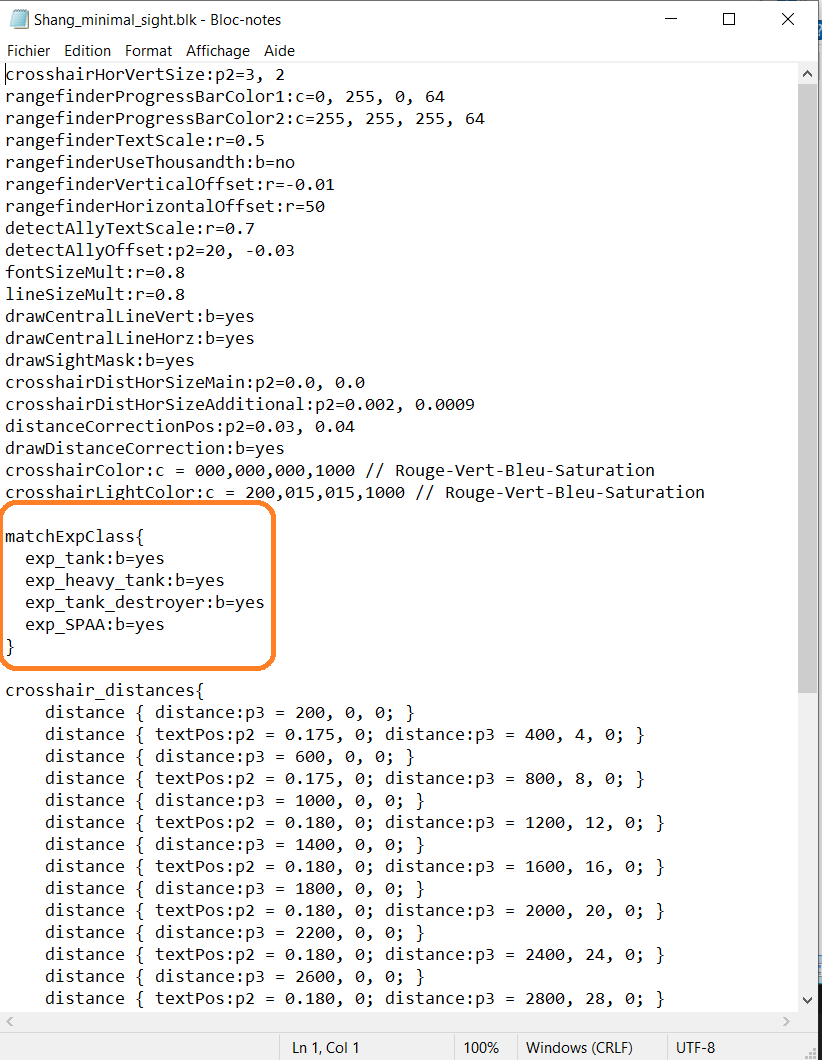
When you have this, you must go in game and setting the sight manualy for each tanks (follow the tutorial i link previously, PART 2, -3°) ). Unfortunatly, we dont have a command for attribute the sight on all tank in once time…
1 Like
Always happy to help. Glad its working :)
1 Like