Hi, I hope this is the correct place to post this.
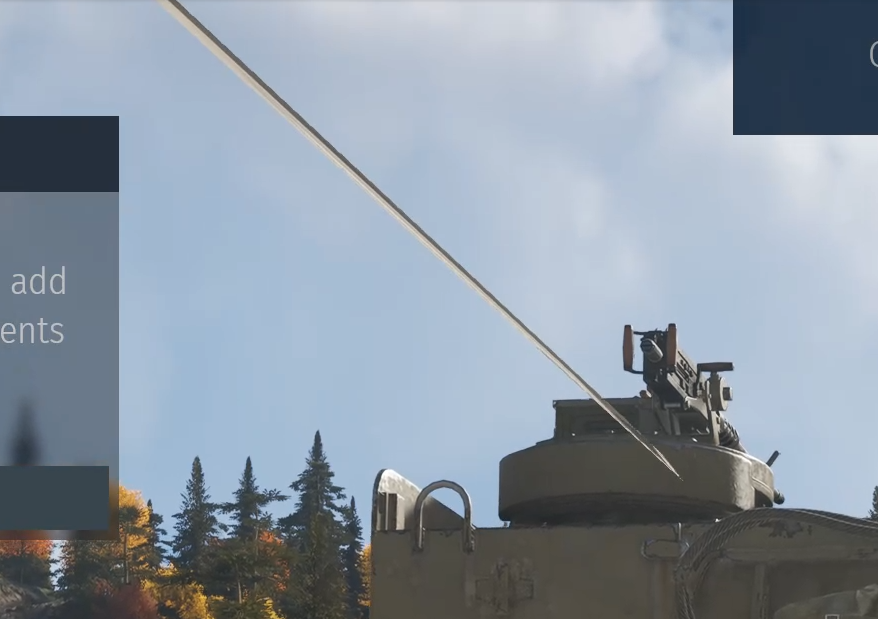
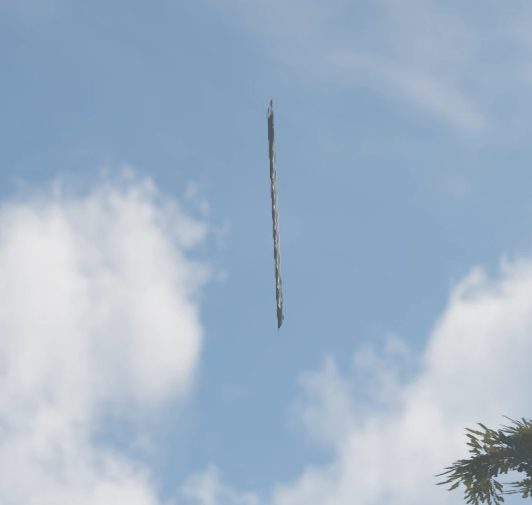
For around a week i am getting graphical artifacts in WT.
99% Tanks only. Not for Airplanes usually.
Mostly White lines that are on the camera layer / own tank only.
Also sometimes bigger and longer ones like glitchy polygons, but rarely. Also never on enemy tanks or teammates.
GPU has been stress tested, scanned and Underclocked, nothing found. Artifacs visible in Recordings, so GPU can be ruled out. Only in War Thunder.
RTX3080. Newest Drivers. Started Before updating drivers too!
Tried DX11 and DX12. No RTX. No Upscaling. Doesent matter if high or low settings.
Did a Game files Verify too.
Interestingly it seems to get worse on the backside of Tanks.
As i wrote, i tried every graphical setting.
DX11 and DX12
High, mid, low.
Dropped every slider to minimum, maximum. Turned on Raytracing, HDR, Vsync, upscale…
does not change anything.
Running capped at 120fps, also tried 144 or 60, no difference.
Also tried the automatic Nvidia Preset, but also no difference.
I am on Windowed borderless. Probably only thing i didnt tried to change.
Will try and edit this in a bit, running all kinds of tests on the PC. But CPU and RAM tests and clock changes also didnt do anything.
When i zoom in ALL the way, i dont get any artifacts. Also not on front of tanks. Its very very strange.
Its like a mesh/vertex or whats its called error in game. On screenshots it actually looks like stretched texture
The nVidia app has a custom profile, which will allow you to pick a slider for it.
The sliders you are mentioning are in the game. By just messing with settings and slamming everything down to nothing you can literally cause yourself more problems because you’re just hoping at that point.
No i didnt change them and also reset the settings with the new drivers, now its totally untouched.
I Changed the clocks because its a common problem on high end system with on the limit clocks. Had Graphical problems in the past with other hardware on a certain game because the XMP put the RAM speed too high, only in one game too. Or a Failing gpu which worked perfectly for multiple years with 100mhz less clock. So that was worth a try
But thing is you’ve missed a lot of troubleshooting steps to make such a change on your knowing it being a common issue, yet I’ve not even come across it…
the cache folders ? Has bugged textures normally. Not bugged vertices. Deleted them in the past too when i got the Rainbow textures thing years ago.
Clocks are the fastest thing to change and check after already changing all the game settings to see if theres any difference.
And even IF a setting was “wrong” it wont cause THAT.
Cant be a common game update thing either since more people would have the problem with such a mainstream GPU.
Thats why i was doubting my system itself. But can now be ruled out.
Maybe someone else had the same problem. Thats why i asked here.
Having a good old google enlightened me to the fact that the old troubleshooting thread on the old forum was gone, and looking about the forums there’s no pins or anything at all to guide you anywhere.
When I first seen the video I was thinking it was particles compared to torn textures.
Did you try installing to a fresh folder/path, or even another drive on another physical drive?