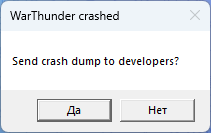
After the last update the game just keeps crashing. I get to the login screen, enter my details, and then instead of loading further it immediately closes and shows War Thunder crashed. I already tried reinstalling the game, checked the integrity of the files, even installed it separately outside of Steam, but nothing worked. The crash happens every single time right after the login screen.
Is there any fix for this?
Wasting my premium days!!!
System Information
  Time of this report: 9/24/2025, 00:52:03
         Machine name: DESKTOP-HRG9NET
           Machine Id: {5DB22162-FB5A-49FB-ABF6-9EF05BA5E265}
     Operating System: Windows 11 Pro 64-bit (10.0, Build 26100) (26100.ge_release.240331-1435)
             Language: Russian (Regional Setting: Russian)
  System Manufacturer: ASUS
         System Model: System Product Name
                 BIOS: 1220 (type: UEFI)
            Processor: Intel(R) Core(TM) i7-14700KF (28 CPUs), ~3.4GHz
               Memory: 49152MB RAM
  Available OS Memory: 48964MB RAM
            Page File: 26925MB used, 25111MB available
          Windows Dir: C:\WINDOWS
      DirectX Version: DirectX 12
  DX Setup Parameters: Not found
     User DPI Setting: 96 DPI (100 percent)
   System DPI Setting: 96 DPI (100 percent)
      DWM DPI Scaling: Disabled
             Miracast: Available, no HDCP
Microsoft Graphics Hybrid: Not Supported
DirectX Database Version: 1.7.4
Auto Super Res Version: Unknown
System Mux Support: Mux Support Inactive - Ok
Mux Target GPU: dGPU
Mux Incompatible List:
DxDiag Version: 10.00.26100.5074 64bit Unicode
DxDiag Notes
  Display Tab 1: No problems found.
  Display Tab 2: No problems found.
    Sound Tab 1: No problems found.
    Sound Tab 2: No problems found.
    Sound Tab 3: No problems found.
    Sound Tab 4: No problems found.
    Sound Tab 5: No problems found.
      Input Tab: No problems found.
DirectX Debug Levels
Direct3D: 0/4 (retail)
DirectDraw: 0/4 (retail)
DirectInput: 0/5 (retail)
DirectMusic: 0/5 (retail)
DirectPlay: 0/9 (retail)
DirectSound: 0/5 (retail)
DirectShow: 0/6 (retail)
Display Devices
       Card name: NVIDIA GeForce RTX 4070 Ti
    Manufacturer: NVIDIA
       Chip type: NVIDIA GeForce RTX 4070 Ti
        DAC type: Integrated RAMDAC
     Device Type: Full Device (POST)
      Device Key: Enum\PCI\VEN_10DE&DEV_2782&SUBSYS_88DC1043&REV_A1
   Device Status: 0180200A [DN_DRIVER_LOADED|DN_STARTED|DN_DISABLEABLE|DN_NT_ENUMERATOR|DN_NT_DRIVER]
Device Problem Code: No Problem
Driver Problem Code: Unknown
Display Memory: 36478 MB
Dedicated Memory: 11996 MB
Shared Memory: 24482 MB
Current Mode: 2560 x 1440 (32 bit) (165Hz)
HDR Support: Supported
Display Topology: Internal
Display Color Space: DXGI_COLOR_SPACE_RGB_FULL_G22_NONE_P709
Color Primaries: Red(0.675781,0.310547), Green(0.267578,0.653320), Blue(0.143555,0.059570), White Point(0.313477,0.329102)
Display Luminance: Min Luminance = 0.000000, Max Luminance = 426.859802, MaxFullFrameLuminance = 426.859802
Monitor Name: Generic PnP Monitor
Monitor Model: Q27G2G3R3B
Monitor Id: AOC2702
Native Mode: 2560 x 1440(p) (59.951Hz)
Output Type: Displayport External
Monitor Capabilities: HDR Supported (BT2020RGB BT2020YCC Eotf2084Supported )
Display Pixel Format: DISPLAYCONFIG_PIXELFORMAT_32BPP
Advanced Color: AdvancedColorSupported
Using DDisplay: Yes
WCG: Wcg Supported
Active Color Mode: DISPLAYCONFIG_ADVANCED_COLOR_MODE_SDR
Driver Name: C:\WINDOWS\System32\DriverStore\FileRepository\nv_dispi.inf_amd64_6cdc9372d41a2731\nvldumdx.dll,C:\WINDOWS\System32\DriverStore\FileRepository\nv_dispi.inf_amd64_6cdc9372d41a2731\nvldumdx.dll,C:\WINDOWS\System32\DriverStore\FileRepository\nv_dispi.inf_amd64_6cdc9372d41a2731\nvldumdx.dll,C:\WINDOWS\System32\DriverStore\FileRepository\nv_dispi.inf_amd64_6cdc9372d41a2731\nvldumdx.dll
Driver File Version: 32.00.0015.8129 (English)
Driver Version: 32.0.15.8129
DDI Version: 12
Adapter Attributes: HARDWARE_TYPE_GPU,D3D11_GRAPHICS,D3D12_GRAPHICS,D3D12_CORE_COMPUTE,D3D12_GENERIC_ML,D3D12_GENERIC_MEDIA
Feature Levels: 12_2,12_1,12_0,11_1,11_0,10_1,10_0,9_3,9_2,9_1,1_0_CORE
Driver Model: WDDM 3.2
Hardware Scheduling: DriverSupportState:Stable Enabled:True
Displayable: Supported
Graphics Preemption: Pixel
Compute Preemption: Dispatch
Miracast: Not Supported by Graphics driver
Detachable GPU: No
Hybrid Graphics GPU: Discrete
GPU Mux Support: Development, None - Unknown Error
Power P-states: Not Supported
Virtualization: Paravirtualization
Block List: No Blocks
Catalog Attributes: Universal:False Declarative:True
Driver Attributes: Final Retail
Driver Date/Size: 05.09.2025 02:00:00, 814360 bytes
WHQL Logo’d: Yes
WHQL Date Stamp: Unknown
Device Identifier: {D7B71E3E-64C2-11CF-326C-D3A80EC2ED35}
Vendor ID: 0x10DE
Device ID: 0x2782
SubSys ID: 0x88DC1043
Revision ID: 0x00A1
Driver Strong Name: oem63.inf:0f066de3a5a8d1ce:Section071:32.0.15.8129:pci\ven_10de&dev_2782
Rank Of Driver: 00CF2001