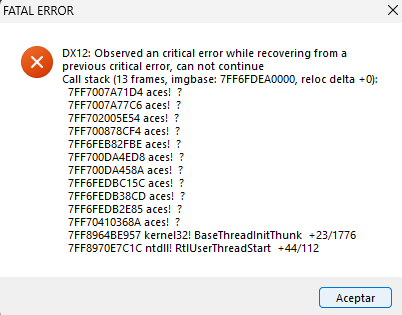
Hello, since last week I’ve been experiencing crashes and driver timeouts with error 81110012. This error occurs every time I start a match: about 10 seconds later the game freezes, and I get the error message plus the AMD driver timeout alert.
I’ve tried everything I could to fix it. Here’s what I’ve done so far:
Updated drivers (26.3.1) — didn’t work
Rolled back to older drivers (25.12.1) — didn’t work
Reinstalled the game — didn’t work
Cleared the cache — didn’t work
Removed all custom skins — didn’t work
Repaired DirectX files — didn’t work
Performed a clean boot — didn’t work
Verified game files on Steam — didn’t work
Checked files in the launcher — didn’t work
I can still play the game using DX11, but there is noticeable stutter and FPS drops, and you also lose FSR/DLSS. Using TAA or TSR makes the game look very bad.
My system:
Ryzen 7 7800X3D
32 GB DDR5
Radeon 7900 XT
1 Like
forgot to attach the image
7600 user here. Try version 26.2.1 because any version above that crashes/driver timeout in realistic ground battles.
also use amd cleanup utility and check box factory reset before installing the driver
1 Like
Hi, so for some reason my drivers got corrupted after the first crash in the game, and every time I opened the Radeon software it kept forcing me to update to 26.3.1, even though the newest version was 26.6.1. That kept happening no matter which version I installed, until I used the auto‑detect and install tool instead of downloading the full drivers manually. That finally installed the correct version (26.6.1), and after that I stopped having DX12 issues.
Thanks, brother.
1 Like
The crashes ar back in nuclear thunder, atleast the rest of the game is good.
Just randomly, be sure to clear the cache folder in the game folder (It’s also not the ‘cache’, it’s the cache folder, in the game folder.) , as well as the ‘compiledShaders’ folder when you have troubles like this.
Then also verify files in the main launcher.
1 Like
Hi it seems to have worked, i am still testing but all good for now thanks man.
Ok today I played a match and it didn’t crash for some reason, this time changed from borderless to fullscreen.
1 Like

