I recently tried moving my War Thunder installation to a new drive, installing it in the drive root as D:\WarThunder to ensure it has the shortest path possible, which I understood to be a problem using CDK with the Steam installation of the game.
But now the time has come to install the CDK to the new game location, I am finding that I am no longer able to run any of the CDK apps. A black console window briefly pops up, then disappears and nothing else happens.
I have attempted to run them as admin from the .cmd files in D:\WarThunder\WarThunderCDK to see if that changed anything, but I’m still met with no response from the CDK
The only .cmd that seems to do anything is the setup file where the console window tells me that D:\WarThunder\WarThunderCDK “is a BAD location”, despite having an absolute minimal path length, and that
some important WarThunder files were not detected
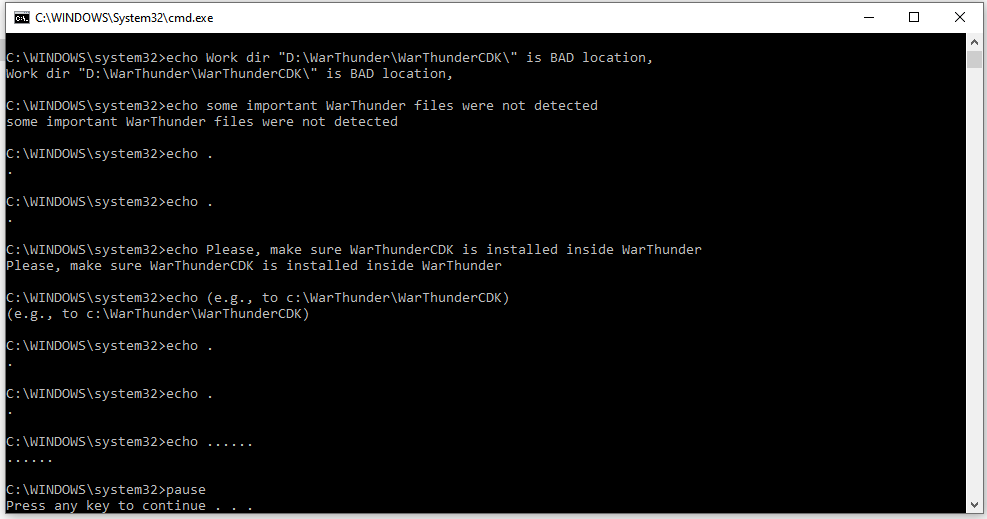
but there’s no specific information on what files may be missing. Game launcher is set to use the full client rather than minimal client, and I have checked the integrity of the installation. Game itself runs without issues.
I do have an installation of the dev server client on another drive, is this perhaps a registry issue, interfering with the CDK setup detecting the War Thunder game files?
The CDK simply will not run at all at all right now. If anybody has any advise on how I might fix it, I’d appreciate help figuring it out