Pinned since it was on the old forum :)
Welcome back!
8 Likes
Heya, long time no see.
I added the newest icons that came with the last two major Updates (“Alpha Strike” and “Seek & Destroy”).
I’m a bit out of the loop concerning naval gameplay, so I am not sure what the new icons are specifically used for. Any info is appreciated.
Cheers
How do you type those without alt code number?
I saw a video with preset names including icons of ships/planes/tanks that looked like those in the list.
You can copy paste the character to the left in the spreadsheet.
Use notepad to make a few lines of pastable messages and such.
You really do need an alt and a keypad option though.
1 Like
some symbols can see in names
so hoow can change name what work? i try some but not accepted the name changer options :(
2 Likes
Thanks for putting this list together, it’s very useful!
I haven’t been playing much naval, and the icons in the battle log aren’t always consistent, so some of these may be wrong, but here are my best ideas of what they are:
Spoiler
66 - HUD icon for fires on own/targeted enemy vessel.
115 - Kill feed icon for crashed aircraft.
152 - Kill feed icon for aerial torpedo.
159 - Possibly the kill feed icon for ramming in naval (if there is one), though I am unsure as it is incredibly rare.
160 - Kill feed icon for destruction of AI units by a vessel.
165 - HUD icon for own/targeted enemy vessel’s propeller shaft status.
211 - WW2 Dutch vehicle imported from another nation.
212 - Post-war Dutch vehicle imported from another nation.
213 - HUD icon for percentage of own/targeted enemy vessel’s crew remaining, kill feed icon for a vessel killed by eliminating all crew.
214 - Kill feed icon for a vessel destroyed by a shell room detonation.
215 - Kill feed icon for a vessel destroyed by a magazine detonation.
216 - Kill feed icon for a vessel destroyed by fire.
217 - Kill feed icon for a vessel that has been sunk due to flooding (or possibly for drowning by an ally, in which case the death is attributed to nobody).
218 - Kill feed icon, unsure what the criteria are.
219 - Kill feed icon for ship-launched torpedo.
220 - Indicator for a naval mine in the water.
1 Like
altCodePics16-Oct-2024.zip (91.1 KB)
I’ve got a zip of screenshots of the current codes. They restart at 256 (go figure) here is a list of ones missing from your doc using the cell they belong in and your description
E8 ALT 182 Two playing cards
E39 ALT 180 Filled Rhombus
E53 ALT 199 A soldier
E60 ALT 216 A crate
E62 ALT 215 Globe View of the planet, centered on the Atlantic ocean
E65 ALT 221 Two scimitars crossed
E66 ALT 222 A stylized flame
E88 ALT 184 Two arrows pointing left
E89 ALT 183 Two swords crossed (very similar to icon 53)
E91 ALT 212 Stylized angel wing
E92 ALT 211 Stylized dragon wing
E94 ALT 190 A tower (very similar to icon 183)
E114 ALT 189 A fist
E199 ALT 17 Outline of an iron cross
E213 ALT 10 Stylized Heads of two Crew Members
E212 ALT 8 Stylized Steering Wheel
Alternatives list from first 256 characters
E195 ALT 16 Chevron
Missing from your doc entirely
ALT 185 Bugle with attached Banner
2 Likes
I created a script that will run through whatever numbers I tell it and then take a screenshot and save the character into that folder with the name of the file being the alt code that produces the icon.
So IDK if this forum emails me but if someone wanted me to run through a set of alt codes and give them the results they could just let me know.
1 Like
Back again with a small update. Just one new icon since the last revision (icon 218).
Also big thanks to Zenturion7 for the feature!
Check out the video.
Thank you for your help!
I added ALT 17, ALT 10, ALT 8 and ALT 16 to the list.
ALT 185 (the bugle) was already present as icon 52 (I renamed it from ‘trumpet’ to ‘bugle’ though due to your suggestion.
The other codes all didn’t work for me. I tried switching between different keyboard layouts, but none of them produced icons for me.
1 Like
same i also want that too, both of this names looks realy nice
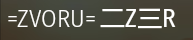
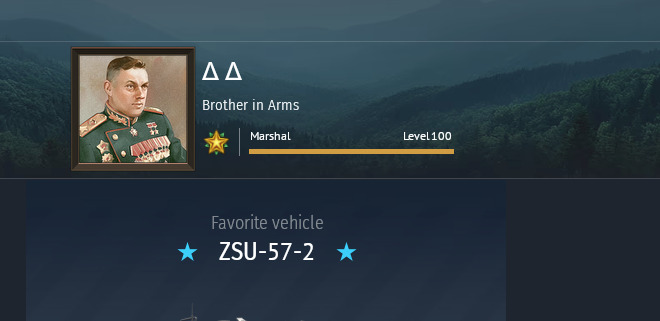
Here is the most up to date version.
BTW, they only have unique symbols up to 256, after that its a repeat so I cleaned up the additional numbers.
Any working code you can add 256 to find another alt code that would work for it.
For example, alt 9 and alt 265 are going to be the same.
OH, and feel free to update the main doc with that information. If I could have commented on the original to help update it I would have.
Heya,
Table updated for “Tusk Force”!
If you have any info on what the icons do, please let me know.
Thats good to know, thanks! I removed the duplicates.
Regarding the ALT code conundrum, I think I have worked out a solution.
The character the ALT code spits out depends on the system’s active code page.
For example, ALT + 182 can give you either “¶”, “” or “╢” depending on that setting. As my system defaults to CP850, I get “” when typing ALT + 182.
To take this into account, I will add the ALT codes I couldn’t verify before (thanks again @tikityler) and add the corresponding CP if necessary.
For example, ALT + 207 only works with CP850, ALT + 182m only works with CP437, so I’ll add that info accordingly. If you find more ALT codes missing, let me know too and add what CP your system has been using at that point (use the chcp command in your cmd).
I got Active code page: 437
So yeah that makes sense. If you know how to change it, I could run the script again on different ones to get all the screenshots.
How do you do TRB one on PS? The warbond one works but not TRB.
207 - probably the (no longer used) icon for the wt mobile event vehicles
211 - WW2 and prior netherlands vehicles
221 - colombian vehicles
224 - bad weather icon + senrai maidens vehicles
227 - indonesian vehicles

War Thunder Icons
Tank - ▮
Plane - ▭
Bluewater Fleet - ┚
Coastal Fleet - ⋛
2 Likes
Good Job mate!