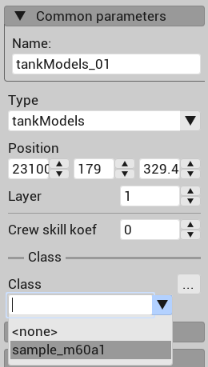
I’m very new to the CDK (Less than 72 hours of usage), and after constant uninstallments and reinstalling the CDK, modifying the config.blk with claimed “fixes” from other forums, and hours of frustration, i cannot get any ground unit types except sample_m60a1
Does ANYONE have any WORKING fixes, or at least an eta to a bug fix for this? I’m using the most recent version of Windows 11 i can get (Not sure what that is tho, but i just had an update yesterday)
@Kaem_1
What you have to do is download the file (config.blk) linked here (this works for the September 18th version of the CDK, it is an updated version to the original hotfix which is likely what has been causing you problems as that one is only compatible with 21st and 24th May version of CDK):
This will restore classes to your CDK. This bug has existed for at least three versions of the CDK now and i don’t know why Gaijin cannot just fix it so users don’t have to ask on the forums for a random hotfix someone luckily came up with.
The same day i posted this comment i already found configuration file that fixed the issue but thanks for trying to help. Do you know a fix for the same issue but in asset viewer? is it the same method as with mission editor?