Hello Gaijin Team and Community.
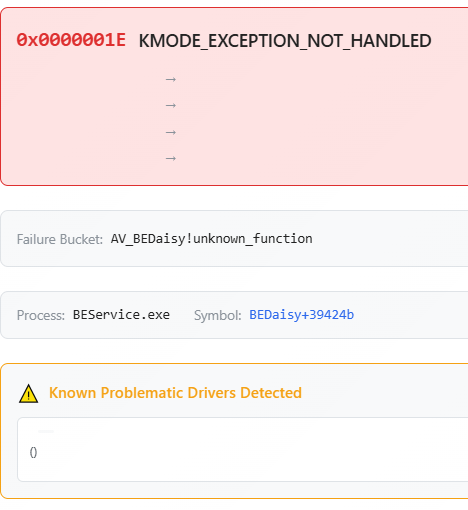
I want to report a critical issue with BattlEye (BEDaisy.sys) causing a BSOD. I investigated the cause of BSODs, and my findings completely disprove the common theories regarding driver or hardware instability.
The actual root cause is a direct conflict between BattlEye and Spotify when War Thunder is launched.
The Spotify Issue:
— Launching Spotify while War Thunder is already running triggers an immediate, 100% reproducible BSOD.
— Keeping Spotify open in the background for a long time eventually leads to a random system reboot while the game is active.
— This issue is exclusive to War Thunder. Other titles using the exact same BattlEye anti-cheat (such as PUBG) run perfectly fine with Spotify in the background.
(screenshot attached).
Popular Theories Debunked:
— CPU/RAM Overclocking: My system is fully stable. The RAM has passed 1.5 hours of the intensive TestMem5 (Anta777 Extreme profile) with 0 errors.
— BIOS Versions: The crash occurs identically on both old BIOS version 170 (2019) and one of the latest 1E0 (2022).
— Drivers: Nvidia and Realtek drivers are working properly, and driver corruption is not the cause.
— Windows Version: The system runs on a stable Windows 10 22H2 build.
— Network Conflicts: There are no active conflicts with WinWS, WinDivert, or similar packet-filtering tools.
This is a software-level conflict between the BattlEye client service for War Thunder and the Spotify desktop application.
Gaijin team, please look into how BattlEye scans or interacts with background media players.
Thank you for your attention. I hope this helps fix the issue for the community.
System Specifications:
— CPU: Intel Core i5-9600KF (4900 MHz @ 1.32V, Ring: 4400 MHz, VCCSA: 1.24V, VCCIO: 1.22V)
— RAM: Crucial Ballistix E-die (3800 MHz @ 1.45V, Timings: 15-20-20-39-600, CR1/CR2) - Fully stable via TM5 Anta777
— GPU: Nvidia GeForce RTX 2070 Super
— Motherboard: MSI Z390-A PRO (Tested on BIOS v170 and v1E0)
— OS: Windows 10 22H2 (Build 19045.6466)
— Windows Defender: Fully disabled and removed via registry
— Spotify Version: Desktop App from official spotify website. (BSOD occurs with both Hardware Acceleration ON and OFF)